

Adjustment#
Hue and saturation adjustments and shift_rgb() take RGB channels at axis -3. Functions
whose name ends in _raw take HSV instead; their RGB counterparts perform that conversion.
Brightness, gamma, logarithmic and sigmoid adjustments, adjust_contrast(), invert(),
posterize(), solarize() and threshold() are elementwise and accept any channel
count. sharpness() filters neighboring pixels and
adjust_contrast_with_mean_subtraction() subtracts an image mean, so their output also
depends on the rest of the image.
The brightness, contrast, gamma, logarithmic and sigmoid adjustments,
adjust_saturation_with_gray_subtraction(), posterize(), solarize(),
sharpness() and shift_rgb() expect a floating-point image in [0, 1] and raise
TypeCheckError (a TypeError) for an integer image; convert
8-bit data with image.float() / 255 first. adjust_hue(), adjust_saturation(),
add_weighted() and invert() (with max_val) also accept integer input.
Functions#
- kornia.enhance.add_weighted(src1, alpha, src2, beta, gamma)[source]#
Calculate the weighted sum of two Tensors.
- Convention:
src1 and src2 must have exactly the same shape; a Python number coefficient applies to every element. A tensor coefficient must broadcast to src1’s shape without changing it, such as a 0-d scalar or a per-image (B, 1, 1, 1) weight; a mismatched or extra leading axis raises. See
AddWeightedfor the module wrapper.
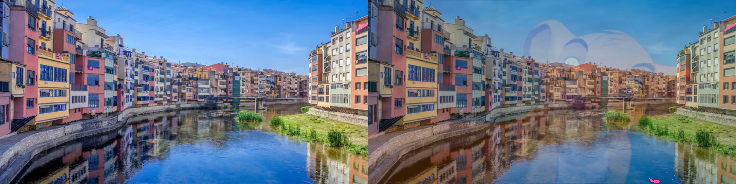
The function calculates the weighted sum of two Tensors as follows:
\[out = src1 * alpha + src2 * beta + gamma\]- Parameters:
src1 (
Tensor) – torch.Tensor with an arbitrary shape, equal to shape of src2.alpha (
Union[float,Tensor]) – weight of the src1 elements, a float or a tensor broadcastable to the src1 shape.src2 (
Tensor) – torch.Tensor with an arbitrary shape, equal to shape of src1.beta (
Union[float,Tensor]) – weight of the src2 elements, a float or a tensor broadcastable to the src1 shape.gamma (
Union[float,Tensor]) – value added to each sum, a float or a tensor broadcastable to the src1 shape.
- Return type:
- Returns:
Weighted torch.Tensor with shape equal to src1 and src2 shapes.
Example
>>> input1 = torch.rand(1, 1, 5, 5)
>>> input2 = torch.rand(1, 1, 5, 5)
>>> output = add_weighted(input1, 0.5, input2, 0.5, 1.0)
>>> output.shape
torch.Size([1, 1, 5, 5])
- kornia.enhance.adjust_brightness(image, factor, clip_output=True)[source]#
Adjust the brightness of an image torch.Tensor.
- Convention:
Adds factor to RGB values; clip_output controls the final [0, 1] clamp.

This implementation follows Szeliski’s book convention, where brightness is defined as an additive operation directly to raw pixel and shift its values according the applied factor and range of the image values. Beware that other framework might use different conventions which can be difficult to reproduce exact results.
The input image and factor is expected to be in the range of [0, 1].
Tip
By applying a large factor might prouce clipping or loss of image detail. We recommenda to apply small factors to avoid the mentioned issues. Ideally one must implement the adjustment of image intensity with other techniques suchs as
kornia.enhance.adjust_gamma(). More details in the following link: https://scikit-image.org/docs/dev/auto_examples/color_exposure/plot_log_gamma.html#sphx-glr-auto-examples-color-exposure-plot-log-gamma-py- Parameters:
image (
Tensor) – Image to be adjusted in the shape of \((*, H, W)\).factor (
Union[float,Tensor]) – Brightness adjust factor per element in the batch. It’s recommended to bound the factor by [0, 1]. 0 does not modify the input image while any other number modify the brightness.clip_output (
bool, optional) – Whether to clip output to be in [0,1]. Default:True
- Return type:
- Returns:
Adjusted torch.Tensor in the shape of \((*, H, W)\).
Note
See a working example here.
Example
>>> x = torch.ones(1, 1, 2, 2)
>>> adjust_brightness(x, 1.)
tensor([[[[1., 1.],
          [1., 1.]]]])
>>> x = torch.ones(2, 5, 3, 3)
>>> y = torch.tensor([0.25, 0.50])
>>> adjust_brightness(x, y).shape
torch.Size([2, 5, 3, 3])
- kornia.enhance.adjust_brightness_accumulative(image, factor, clip_output=True)[source]#
Adjust the brightness accumulatively of an image torch.Tensor.
- Convention:
Multiplies each image by factor; factor=1 preserves it and factor=0 produces black, unlike
adjust_brightness()which adds factor.
This implementation follows PIL convention.
The input image and factor is expected to be in the range of [0, 1].
- Parameters:
image (
Tensor) – Image to be adjusted in the shape of \((*, H, W)\).factor (
Union[float,Tensor]) – Brightness factor per element in the batch. The image is multiplied by it, so1leaves an image in[0, 1]unchanged,0gives a black image and a factor above1brightens it.clip_output (
bool, optional) – Whether to clip output to be in [0,1]. Default:True
- Return type:
- Returns:
Adjusted torch.Tensor in the shape of \((*, H, W)\).
Example
>>> x = torch.ones(1, 1, 2, 2)
>>> adjust_brightness_accumulative(x, 1.)
tensor([[[[1., 1.],
          [1., 1.]]]])
>>> x = torch.ones(2, 5, 3, 3)
>>> y = torch.tensor([0.25, 0.50])
>>> adjust_brightness_accumulative(x, y).shape
torch.Size([2, 5, 3, 3])
- kornia.enhance.adjust_contrast(image, factor, clip_output=True)[source]#
Adjust the contrast of an image torch.Tensor.
- Convention:
Contrast is a direct multiplicative scale of RGB values; factor=1 preserves input and clip_output controls the final [0, 1] clamp.

This implementation follows Szeliski’s book convention, where contrast is defined as a multiplicative operation directly to raw pixel values. Beware that other frameworks might use different conventions which can be difficult to reproduce exact results.
The input image and factor is expected to be in the range of [0, 1].
Tip
This is not the preferred way to adjust the contrast of an image. Ideally one must implement
kornia.enhance.adjust_gamma(). More details in the following link: https://scikit-image.org/docs/dev/auto_examples/color_exposure/plot_log_gamma.html#sphx-glr-auto-examples-color-exposure-plot-log-gamma-py- Parameters:
image (
Tensor) – Image to be adjusted in the shape of \((*, H, W)\).factor (
Union[float,Tensor]) – Contrast adjust factor per element in the batch. 0 generates a completely black image, 1 does not modify the input image while any other non-negative number modify the brightness by this factor.clip_output (
bool, optional) – whether to clip the output image with range of [0, 1]. Default:True
- Return type:
- Returns:
Adjusted image in the shape of \((*, H, W)\).
Note
See a working example here.
Note
The non-negativity check on
factorruns on CPU and CUDA (viatorch._assert_async). kornia skips it on MPS by design, so invalid values do not raise there.Example
>>> import torch
>>> x = torch.ones(1, 1, 2, 2)
>>> adjust_contrast(x, 0.5)
tensor([[[[0.5000, 0.5000],
          [0.5000, 0.5000]]]])
>>> x = torch.ones(2, 5, 3, 3)
>>> y = torch.tensor([0.65, 0.50])
>>> adjust_contrast(x, y).shape
torch.Size([2, 5, 3, 3])
- kornia.enhance.adjust_contrast_with_mean_subtraction(image, factor)[source]#
Adjust the contrast of an image torch.Tensor by subtracting the mean over channels.
Note
this is just a convenience function to have compatibility with Pil. For exact definition of image contrast adjustment consider using
kornia.enhance.adjust_gamma().- Parameters:
- Return type:
- Returns:
Adjusted image in the shape of \((*, H, W)\).
Example
>>> import torch
>>> x = torch.ones(1, 1, 2, 2)
>>> adjust_contrast_with_mean_subtraction(x, 0.5)
tensor([[[[1., 1.],
          [1., 1.]]]])
>>> x = torch.ones(2, 5, 3, 3)
>>> y = torch.tensor([0.65, 0.50])
>>> adjust_contrast_with_mean_subtraction(x, y).shape
torch.Size([2, 5, 3, 3])
- kornia.enhance.adjust_gamma(input, gamma, gain=1.0)[source]#
Perform gamma correction on an image.
- Convention:
Applies gain * input ** gamma elementwise, then clamps to [0, 1].
The input image is expected to be in the range of [0, 1].
- Parameters:
input (
Tensor) – Image to be adjusted in the shape of \((*, H, W)\).gamma (
Union[float,Tensor]) – Non negative real number, same as ygammay in the equation. gamma larger than 1 make the shadows darker, while gamma smaller than 1 make dark regions lighter.gain (
Union[float,Tensor], optional) – The constant multiplier. Default:1.0
- Return type:
- Returns:
Adjusted image in the shape of \((*, H, W)\).
Note
See a working example here.
Note
The non-negativity check on
gamma/gainruns on CPU and CUDA (viatorch._assert_async). kornia skips it on MPS by design, so invalid values do not raise there.Example
>>> x = torch.ones(1, 1, 2, 2)
>>> adjust_gamma(x, 1.0, 2.0)
tensor([[[[1., 1.],
          [1., 1.]]]])
>>> x = torch.ones(2, 5, 3, 3)
>>> y1 = torch.ones(2) * 1.0
>>> y2 = torch.ones(2) * 2.0
>>> adjust_gamma(x, y1, y2).shape
torch.Size([2, 5, 3, 3])
- kornia.enhance.adjust_hue(image, factor)[source]#
Adjust hue of an image.
- Convention:
Expects RGB in [0, 1] with channel dimension -3. factor is a hue angle in radians; see
adjust_hue_raw()for the HSV operation.

The image is expected to be an RGB image in the range of [0, 1].
- Parameters:
image (
Tensor) – Image to be adjusted in the shape of \((*, 3, H, W)\).factor (
Union[float,Tensor]) – How much to shift the hue channel. Should be in [-PI, PI]. PI and -PI give complete reversal of hue channel in HSV space in positive and negative direction respectively. 0 means no shift. Therefore, both -PI and PI will give an image with complementary colors while 0 gives the original image.
- Return type:
- Returns:
Adjusted image in the shape of \((*, 3, H, W)\).
Note
See a working example here.
Example
>>> x = torch.ones(1, 3, 2, 2)
>>> adjust_hue(x, 3.141516).shape
torch.Size([1, 3, 2, 2])
>>> x = torch.ones(2, 3, 3, 3)
>>> y = torch.ones(2) * 3.141516
>>> adjust_hue(x, y).shape
torch.Size([2, 3, 3, 3])
- kornia.enhance.adjust_hue_raw(image, factor)[source]#
Adjust hue of an image.
- Return type:
- Convention:
Expects HSV. factor is an angle in radians added to the hue, and the sum is wrapped into [0, 2π).
adjust_hue()supplies the RGB-domain wrapper.
Expecting image to be in hsv format already.
- kornia.enhance.adjust_saturation(image, factor)[source]#
Adjust color saturation of an image.
- Convention:
Expects RGB in [0, 1] with channel dimension -3. factor=1 preserves the image; factor=0 removes HSV saturation, so each pixel becomes max(R, G, B) rather than its luma.
adjust_saturation_with_gray_subtraction()blends with luma, as torchvision and PIL do; seeadjust_saturation_raw()for the HSV-domain primitive.

The image is expected to be an RGB image in the range of [0, 1].
- Parameters:
- Return type:
- Returns:
Adjusted image in the shape of \((*, 3, H, W)\).
Note
See a working example here.
Example
>>> x = torch.ones(1, 3, 3, 3)
>>> adjust_saturation(x, 2.).shape
torch.Size([1, 3, 3, 3])
>>> x = torch.ones(2, 3, 3, 3)
>>> y = torch.tensor([1., 2.])
>>> adjust_saturation(x, y).shape
torch.Size([2, 3, 3, 3])
- kornia.enhance.adjust_saturation_raw(image, factor)[source]#
Adjust color saturation of an image.
- Return type:
- Convention:
Expects HSV, not RGB. The saturation channel is multiplied by factor and clamped to [0, 1];
adjust_saturation()performs RGB conversion.
Expecting image to be in hsv format already.
- kornia.enhance.adjust_saturation_with_gray_subtraction(image, factor)[source]#
Adjust color saturation of an image by blending the image with its grayscaled version.
- Convention:
factor=0 selects grayscale and factor=1 preserves RGB input; grayscale input is returned unchanged. This differs from HSV saturation scaling.
The image is expected to be an RGB image or a gray image in the range of [0, 1]. If it is an RGB image, returns blending of the image with its grayscaled version. If it is a gray image, returns the image.
Note
this is just a convenience function to have compatibility with Pil
- Parameters:
- Return type:
- Returns:
Adjusted image in the shape of \((*, 3, H, W)\).
Example
>>> x = torch.ones(1, 3, 3, 3)
>>> adjust_saturation_with_gray_subtraction(x, 2.).shape
torch.Size([1, 3, 3, 3])
>>> x = torch.ones(2, 3, 3, 3)
>>> y = torch.tensor([1., 2.])
>>> adjust_saturation_with_gray_subtraction(x, y).shape
torch.Size([2, 3, 3, 3])
- kornia.enhance.adjust_sigmoid(image, cutoff=0.5, gain=10, inv=False)[source]#
Adjust sigmoid correction on the input image torch.Tensor.
- Convention:
Applies a sigmoid around cutoff; inv selects its complementary curve.
The input image is expected to be in the range of [0, 1].
- Reference:
- [1]: Gustav J. Braun, “Image Lightness Rescaling Using Sigmoidal Contrast Enhancement Functions”,
- Parameters:
image (
Tensor) – Image to be adjusted in the shape of \((*, H, W)\).cutoff (
float, optional) – The cutoff of sigmoid function. Default:0.5gain (
float, optional) – The multiplier of sigmoid function. Default:10inv (
bool, optional) – If is set to True the function will return the inverse sigmoid correction. Default:False
- Return type:
- Returns:
Adjusted torch.Tensor in the shape of \((*, H, W)\).
Example
>>> x = torch.ones(1, 1, 2, 2)
>>> adjust_sigmoid(x, gain=0)
tensor([[[[0.5000, 0.5000],
          [0.5000, 0.5000]]]])
- kornia.enhance.adjust_log(image, gain=1, inv=False, clip_output=True)[source]#
Adjust log correction on the input image torch.Tensor.
- Convention:
inv selects exponential instead of logarithmic correction; clip_output controls the final [0, 1] clamp.
The input image is expected to be in the range of [0, 1].
Reference: [1]: http://www.ece.ucsb.edu/Faculty/Manjunath/courses/ece178W03/EnhancePart1.pdf
- Parameters:
image (
Tensor) – Image to be adjusted in the shape of \((*, H, W)\).gain (
float, optional) – The multiplier of logarithmic function. Default:1inv (
bool, optional) – If is set to True the function will return the inverse logarithmic correction. Default:Falseclip_output (
bool, optional) – Whether to clip the output image with range of [0, 1]. Default:True
- Return type:
- Returns:
Adjusted torch.Tensor in the shape of \((*, H, W)\).
Example
>>> x = torch.zeros(1, 1, 2, 2)
>>> adjust_log(x, inv=True)
tensor([[[[0., 0.],
          [0., 0.]]]])
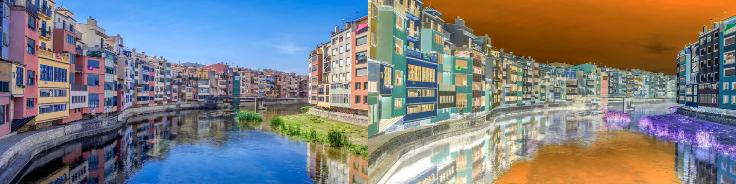
- kornia.enhance.invert(image, max_val=None)[source]#
Invert the values of an input image torch.Tensor by its maximum value.
- Convention:
Returns max_val - image elementwise. Omitting max_val uses one in the input dtype and device; pass max_val=torch.tensor(255) for uint8 images.
- Parameters:
- Return type:
Example
>>> img = torch.rand(1, 2, 4, 4)
>>> invert(img).shape
torch.Size([1, 2, 4, 4])
>>> img = 255. * torch.rand(1, 2, 3, 4, 4)
>>> invert(img, torch.as_tensor(255.)).shape
torch.Size([1, 2, 3, 4, 4])
>>> img = torch.rand(1, 3, 4, 4)
>>> invert(img, torch.as_tensor([[[[1.]]]])).shape
torch.Size([1, 3, 4, 4])
- kornia.enhance.posterize(input, bits)[source]#
Reduce the number of bits for each color channel.
- Convention:
Expects values in [0, 1] and quantizes them through 8-bit integers; bits=8 returns the input unchanged. bits is a scalar, (1,), or a leading prefix of the input shape such as (B,) or (B, C), with arbitrary leading image dimensions flattened into B. Empty leading dimensions are supported; channels and spatial dimensions must be non-empty.

Non-differentiable function,
torch.uint8involved.- Parameters:
input (
Tensor) – image torch.Tensor with shape \((*, C, H, W)\) to posterize.bits (
Union[int,Tensor]) – number of high bits. Must be in range [0, 8]. If int or one-element torch.Tensor, the same bits value is used across the whole batch. A 1-d tensor with multiple elements specifies one value per sample, not per channel; its length must equal the normalized batch sizeBafter flattening leading dimensions. Any other length raisesBatch size must be equal between bits and input. A tensor with multiple dimensions specifies element-channel-wise values; its shape must match the corresponding leading dimensions of the normalized(B, C, H, W)input.
- Return type:
- Returns:
Image with reduced color channels with shape \((*, C, H, W)\).
Example
>>> x = torch.rand(1, 6, 3, 3)
>>> out = posterize(x, bits=8)
>>> torch.testing.assert_close(x, out)
>>> x = torch.rand(2, 6, 3, 3)
>>> bits = torch.tensor([4, 2])
>>> posterize(x, bits).shape
torch.Size([2, 6, 3, 3])
- kornia.enhance.sharpness(input, factor)[source]#
Apply sharpness to the input torch.Tensor.
- Convention:
factor=0 selects the blurred image and factor=1 preserves the input; factor is a float or a (B,) tensor with one value per image, with arbitrary leading image dimensions flattened into B. Empty leading dimensions are supported; channels must be non-empty and both spatial dimensions must be at least 3 pixels.

Implemented Sharpness function from PIL using torch ops. This implementation refers to: tensorflow/tpu
- Parameters:
input (
Tensor) – image torch.Tensor with shape \((*, C, H, W)\) to sharpen.factor (
Union[float,Tensor]) – blend factor between the smoothed copy and the input.0returns the smoothed image,1returns the input, and a factor above1sharpens. It is not validated:0and negative factors are accepted and extrapolate past the smoothed image. A scalar or 0-d tensor applies the same factor across the whole batch. A 1-d tensor specifies one factor per sample; its length must equal the normalized batch sizeBafter flattening leading dimensions. A length-one vector does not broadcast whenBis greater than one.
- Return type:
- Returns:
Sharpened image or images with shape \((*, C, H, W)\).
Example
>>> x = torch.rand(1, 1, 5, 5)
>>> sharpness(x, 0.5).shape
torch.Size([1, 1, 5, 5])
- kornia.enhance.shift_rgb(image, r_shift, g_shift, b_shift)[source]#
Shift rgb channels.
- Return type:
- Convention:
Input must have shape (B, 3, H, W); another rank raises
ShapeErrorand another channel count raisesImageError. One RGB shift per batch element is assembled as (B, 3, 1, 1), then results are clamped to [0, 1].
Shift each image’s channel by either r_shift for red, g_shift for green and b_shift for blue channels.
- kornia.enhance.solarize(input, thresholds=0.5, additions=None)[source]#
Add an amount to every pixel, clamp, then invert the pixels at or above a threshold.
- Convention:
additions are applied and clamped before values at or above thresholds are inverted about one.

additionsis added to the whole image and the sum is clamped into[0, 1]; only then is each pixel compared againstthresholds, and every pixel at or above it is replaced by1 - value. The addition is therefore applied on both sides of the threshold, and it can move a pixel across it: withthresholds=0.5andadditions=0.2,[0.1, 0.4, 0.6, 0.9]comes back as[0.3, 0.4, 0.2, 0.0]. The value of ‘addition’ is in the closed range [-0.5, 0.5].- Parameters:
input (
Tensor) – image torch.Tensor with shapes like \((*, C, H, W)\) to solarize.thresholds (
Union[float,Tensor], optional) – solarize thresholds. If int or one element torch.Tensor, input will be solarized across the whole batch. If 1-d torch.Tensor, input will be solarized element-wise, len(thresholds) == len(input). Default:0.5additions (
Union[float,Tensor,None], optional) – in the closed range [-0.5, 0.5], endpoints included. If None, no addition will be performed. If int or one element torch.Tensor, same addition will be added across the whole batch. If 1-d torch.Tensor, additions will be added element-wisely, len(additions) == len(input). Default:None
- Return type:
- Returns:
The solarized images with shape \((*, C, H, W)\).
Note
The range check on
additionsruns viatorch._assert_asyncon the device ofadditions. kornia skips it for anadditionstensor on MPS, so invalid values do not raise there, but a float, or a CPU tensor, is checked on the CPU and raises for an MPS image too.Example
>>> x = torch.rand(1, 4, 3, 3)
>>> out = solarize(x, thresholds=0.5, additions=0.)
>>> out.shape
torch.Size([1, 4, 3, 3])
>>> x = torch.rand(2, 4, 3, 3)
>>> thresholds = torch.tensor([0.8, 0.5])
>>> additions = torch.tensor([-0.25, 0.25])
>>> solarize(x, thresholds, additions).shape
torch.Size([2, 4, 3, 3])
- kornia.enhance.threshold(input, thresh, maxval=255.0, type=ThresholdType.THRESH_BINARY)[source]#
Apply a fixed-level threshold to each element in the input tensor.
- Convention:
The comparison is strict (input > thresh). thresh and maxval broadcast over input on its device. maxval is converted to the input’s dtype, and so is thresh on a floating-point input. On an integer input, thresh is not cast: as in OpenCV, an element passes when it is greater than floor(thresh), so a thresh below the dtype’s range passes every element and one at or above its maximum passes none. THRESH_TRUNC then writes floor(thresh), or the dtype’s minimum for a thresh below its range. Threshold is the module wrapper; ThresholdType supplies the fixed-mode values.
Implements OpenCV-like behavior for the following threshold types: - THRESH_BINARY - THRESH_BINARY_INV - THRESH_TRUNC - THRESH_TOZERO - THRESH_TOZERO_INV
- Parameters:
input (
Tensor) – Image tensor of shape (…, H, W). Typically (B, C, H, W).thresh (
Union[float,Tensor]) – Threshold value (scalar or tensor broadcastable to input).maxval (
Union[float,Tensor], optional) – Maximum value used with binary thresholding types. Default:255.0type (
Union[int,ThresholdType], optional) – Threshold type. Default:ThresholdType.THRESH_BINARY
- Return type:
- Returns:
Thresholded tensor with same shape/dtype/device as input.
- Raises:
NotImplementedError – if THRESH_OTSU flag is passed.
ValueError – if type is not supported.
Modules#
- class kornia.enhance.AdjustBrightness(brightness_factor)[source]#
Adjust Brightness of an image.
- Convention:
See
adjust_brightness()for the additive factor; this module always clips to [0, 1].
This implementation aligns OpenCV, not PIL. Hence, the output differs from TorchVision. The input image is expected to be in the range of [0, 1].
- Parameters:
brightness_factor (
Union[float,Tensor]) – Brightness adjust factor per element in the batch. 0 does not modify the input image while any other number modify the brightness.
- Shape:
Input: Image/Input to be adjusted in the shape of \((*, N)\).
Output: Adjusted image in the shape of \((*, N)\).
Example
>>> x = torch.ones(1, 1, 3, 3)
>>> AdjustBrightness(1.)(x)
tensor([[[[1., 1., 1.],
          [1., 1., 1.],
          [1., 1., 1.]]]])
>>> x = torch.ones(2, 5, 3, 3)
>>> y = torch.ones(2)
>>> AdjustBrightness(y)(x).shape
torch.Size([2, 5, 3, 3])
- class kornia.enhance.AdjustBrightnessAccumulative(brightness_factor)[source]#
Adjust Brightness of an image accumulatively.
- Convention:
See
adjust_brightness_accumulative()for the multiplicative factor; this module always clips to [0, 1].
It multiplies the image by
factor, as torchvision’s and PIL’s brightness does. The input image is expected to be in the range of [0, 1].- Parameters:
brightness_factor (
Union[float,Tensor]) – Brightness factor per element in the batch. The image is multiplied by it and clamped into[0, 1], so1leaves an image in[0, 1]unchanged,0gives a black image and a factor above1brightens it.
- Shape:
Input: Image/Input to be adjusted in the shape of \((*, N)\).
Output: Adjusted image in the shape of \((*, N)\).
Example
>>> x = torch.ones(1, 1, 3, 3)
>>> AdjustBrightnessAccumulative(1.)(x)
tensor([[[[1., 1., 1.],
          [1., 1., 1.],
          [1., 1., 1.]]]])
>>> x = torch.ones(2, 5, 3, 3)
>>> y = torch.ones(2)
>>> AdjustBrightnessAccumulative(y)(x).shape
torch.Size([2, 5, 3, 3])
- class kornia.enhance.AdjustContrast(contrast_factor)[source]#
Adjust Contrast of an image.
- Convention:
See
adjust_contrast()for the multiplicative scale; this module always clips to [0, 1].
This implementation aligns OpenCV, not PIL. Hence, the output differs from TorchVision. The input image is expected to be in the range of [0, 1].
- Parameters:
contrast_factor (
Union[float,Tensor]) – Contrast adjust factor per element in the batch. 0 generates a completely black image, 1 does not modify the input image while any other non-negative number modify the brightness by this factor.
- Shape:
Input: Image/Input to be adjusted in the shape of \((*, N)\).
Output: Adjusted image in the shape of \((*, N)\).
Example
>>> x = torch.ones(1, 1, 3, 3)
>>> AdjustContrast(0.5)(x)
tensor([[[[0.5000, 0.5000, 0.5000],
          [0.5000, 0.5000, 0.5000],
          [0.5000, 0.5000, 0.5000]]]])
>>> x = torch.ones(2, 5, 3, 3)
>>> y = torch.ones(2)
>>> AdjustContrast(y)(x).shape
torch.Size([2, 5, 3, 3])
- class kornia.enhance.AdjustContrastWithMeanSubtraction(contrast_factor)[source]#
Adjust Contrast of an image.
- Convention:
See
adjust_contrast_with_mean_subtraction()for its mean blend.
For an RGB image it blends the image with its grayscale mean,
factor * image + (1 - factor) * mean, as torchvision and PIL do. The input image is expected to be in the range of [0, 1].- Parameters:
contrast_factor (
Union[float,Tensor]) – Contrast adjust factor per element in the batch by subtracting its mean grayscaled version. 0 generates a completely black image, 1 does not modify the input image while any other non-negative number modify the brightness by this factor.
- Shape:
Input: Image/Input to be adjusted in the shape of \((*, N)\).
Output: Adjusted image in the shape of \((*, N)\).
Example
>>> x = torch.ones(1, 1, 3, 3)
>>> AdjustContrastWithMeanSubtraction(0.5)(x)
tensor([[[[1., 1., 1.],
          [1., 1., 1.],
          [1., 1., 1.]]]])
>>> x = torch.ones(2, 5, 3, 3)
>>> y = torch.ones(2)
>>> AdjustContrastWithMeanSubtraction(y)(x).shape
torch.Size([2, 5, 3, 3])
- class kornia.enhance.AdjustSaturation(saturation_factor)[source]#
Adjust color saturation of an image.
- Convention:
See
adjust_saturation()for the RGB input and factor policy.
The input image is expected to be an RGB image in the range of [0, 1].
- Parameters:
saturation_factor (
Union[float,Tensor]) – How much to adjust the saturation. 0 will give a black and white image, 1 will give the original image while 2 will enhance the saturation by a factor of 2.
- Shape:
Input: Image/torch.Tensor to be adjusted in the shape of \((*, 3, H, W)\).
Output: Adjusted image in the shape of \((*, 3, H, W)\).
Example
>>> x = torch.ones(1, 3, 3, 3)
>>> AdjustSaturation(2.)(x)
tensor([[[[1., 1., 1.],
          [1., 1., 1.],
          [1., 1., 1.]],

         [[1., 1., 1.],
          [1., 1., 1.],
          [1., 1., 1.]],

         [[1., 1., 1.],
          [1., 1., 1.],
          [1., 1., 1.]]]])
>>> x = torch.ones(2, 3, 3, 3)
>>> y = torch.ones(2)
>>> out = AdjustSaturation(y)(x)
>>> torch.nn.functional.mse_loss(x, out)
tensor(0.)
- class kornia.enhance.AdjustSaturationWithGraySubtraction(saturation_factor)[source]#
Adjust color saturation of an image.
- Convention:
See
adjust_saturation_with_gray_subtraction()for blending.
It blends the image with its grayscale,
factor * image + (1 - factor) * gray, as torchvision and PIL do. The input image is expected to be in the range of [0, 1].The input image is expected to be an RGB or gray image in the range of [0, 1].
- Parameters:
saturation_factor (
Union[float,Tensor]) – How much to adjust the saturation. 0 will give a black and white image, 1 will give the original image while 2 will enhance the saturation by a factor of 2.
- Shape:
Input: Image/torch.Tensor to be adjusted in the shape of \((*, 3, H, W)\).
Output: Adjusted image in the shape of \((*, 3, H, W)\).
Example
>>> x = torch.ones(1, 3, 3, 3)
>>> AdjustSaturationWithGraySubtraction(2.)(x)
tensor([[[[1., 1., 1.],
          [1., 1., 1.],
          [1., 1., 1.]],

         [[1., 1., 1.],
          [1., 1., 1.],
          [1., 1., 1.]],

         [[1., 1., 1.],
          [1., 1., 1.],
          [1., 1., 1.]]]])
>>> x = torch.ones(2, 3, 3, 3)
>>> y = torch.ones(2)
>>> out = AdjustSaturationWithGraySubtraction(y)(x)
>>> torch.nn.functional.mse_loss(x, out)
tensor(0.)
- class kornia.enhance.AdjustHue(hue_factor)[source]#
Adjust hue of an image.
- Convention:
See
adjust_hue()for RGB input and radians convention.
factoris in radians: it matches torchvision’sadjust_huewithhue_factor = factor / (2 * pi). The input image is expected to be in the range of [0, 1].The input image is expected to be an RGB image in the range of [0, 1].
- Parameters:
hue_factor (
Union[float,Tensor]) – How much to shift the hue channel. Should be in [-PI, PI]. PI and -PI give complete reversal of hue channel in HSV space in positive and negative direction respectively. 0 means no shift. Therefore, both -PI and PI will give an image with complementary colors while 0 gives the original image.
- Shape:
Input: Image/torch.Tensor to be adjusted in the shape of \((*, 3, H, W)\).
Output: Adjusted image in the shape of \((*, 3, H, W)\).
Example
>>> x = torch.ones(1, 3, 3, 3)
>>> AdjustHue(3.141516)(x)
tensor([[[[1., 1., 1.],
          [1., 1., 1.],
          [1., 1., 1.]],

         [[1., 1., 1.],
          [1., 1., 1.],
          [1., 1., 1.]],

         [[1., 1., 1.],
          [1., 1., 1.],
          [1., 1., 1.]]]])
>>> x = torch.ones(2, 3, 3, 3)
>>> y = torch.ones(2) * 3.141516
>>> AdjustHue(y)(x).shape
torch.Size([2, 3, 3, 3])
- class kornia.enhance.AdjustGamma(gamma, gain=1.0)[source]#
Perform gamma correction on an image.
- Convention:
See
adjust_gamma()for the elementwise power convention.
The input image is expected to be in the range of [0, 1].
- Parameters:
- Shape:
Input: Image to be adjusted in the shape of \((*, N)\).
Output: Adjusted image in the shape of \((*, N)\).
Example
>>> x = torch.ones(1, 1, 3, 3)
>>> AdjustGamma(1.0, 2.0)(x)
tensor([[[[1., 1., 1.],
          [1., 1., 1.],
          [1., 1., 1.]]]])
>>> x = torch.ones(2, 5, 3, 3)
>>> y1 = torch.ones(2) * 1.0
>>> y2 = torch.ones(2) * 2.0
>>> AdjustGamma(y1, y2)(x).shape
torch.Size([2, 5, 3, 3])
- class kornia.enhance.AdjustSigmoid(cutoff=0.5, gain=10, inv=False)[source]#
Adjust the contrast of an image torch.Tensor or performs sigmoid correction on the input image torch.Tensor.
- Convention:
See
adjust_sigmoid()for cutoff and inverse-curve policy.
The input image is expected to be in the range of [0, 1].
- Reference:
- [1]: Gustav J. Braun, “Image Lightness Rescaling Using Sigmoidal Contrast Enhancement Functions”,
- Parameters:
image – Image to be adjusted in the shape of \((*, H, W)\).
cutoff (
float, optional) – The cutoff of sigmoid function. Default:0.5gain (
float, optional) – The multiplier of sigmoid function. Default:10inv (
bool, optional) – If is set to True the function will return the negative sigmoid correction. Default:False
Example
>>> x = torch.ones(1, 1, 2, 2)
>>> AdjustSigmoid(gain=0)(x)
tensor([[[[0.5000, 0.5000],
          [0.5000, 0.5000]]]])
- class kornia.enhance.AdjustLog(gain=1, inv=False, clip_output=True)[source]#
Adjust log correction on the input image torch.Tensor.
- Convention:
See
adjust_log()for logarithmic and inverse behavior.
The input image is expected to be in the range of [0, 1].
Reference: [1]: http://www.ece.ucsb.edu/Faculty/Manjunath/courses/ece178W03/EnhancePart1.pdf
- Parameters:
image – Image to be adjusted in the shape of \((*, H, W)\).
gain (
float, optional) – The multiplier of logarithmic function. Default:1inv (
bool, optional) – If is set to True the function will return the inverse logarithmic correction. Default:Falseclip_output (
bool, optional) – Whether to clip the output image with range of [0, 1]. Default:True
Example
>>> x = torch.zeros(1, 1, 2, 2)
>>> AdjustLog(inv=True)(x)
tensor([[[[0., 0.],
          [0., 0.]]]])
- class kornia.enhance.AddWeighted(alpha, beta, gamma)[source]#
Calculate the weighted sum of two Tensors.
- Convention:
See
add_weighted().
The function calculates the weighted sum of two Tensors as follows:
\[out = src1 * alpha + src2 * beta + gamma\]- Parameters:
alpha (
Union[float,Tensor]) – weight of the src1 elements, a float or a tensor broadcastable to the src1 shape.beta (
Union[float,Tensor]) – weight of the src2 elements, a float or a tensor broadcastable to the src1 shape.gamma (
Union[float,Tensor]) – value added to each sum, a float or a tensor broadcastable to the src1 shape.
- Shape:
Input1: torch.Tensor with an arbitrary shape, equal to shape of Input2.
Input2: torch.Tensor with an arbitrary shape, equal to shape of Input1.
Output: Weighted torch.Tensor with shape equal to src1 and src2 shapes.
Example
>>> input1 = torch.rand(1, 1, 5, 5)
>>> input2 = torch.rand(1, 1, 5, 5)
>>> output = AddWeighted(0.5, 0.5, 1.0)(input1, input2)
>>> output.shape
torch.Size([1, 1, 5, 5])
- class kornia.enhance.Invert(max_val=None)[source]#
Invert the values of an input torch.Tensor by its maximum value.
- Convention:
See
invert()for max-value subtraction behavior.
- Parameters:
Example
>>> img = torch.rand(1, 2, 4, 4)
>>> Invert()(img).shape
torch.Size([1, 2, 4, 4])
>>> img = 255. * torch.rand(1, 2, 3, 4, 4)
>>> Invert(torch.as_tensor(255.))(img).shape
torch.Size([1, 2, 3, 4, 4])
>>> img = torch.rand(1, 3, 4, 4)
>>> Invert(torch.as_tensor([[[[1.]]]]))(img).shape
torch.Size([1, 3, 4, 4])