
Colormap#
Render a single-channel image with a color map, e.g. to visualize depth, heat or edge maps.
Functions#
- kornia.color.apply_colormap(input_tensor, colormap)[source]#
Apply to a gray torch.Tensor a colormap.

- Convention:
Accepts a rank-3 (C, H, W) or rank-4 (B, C, H, W) tensor and returns (B, 3*C, H, W), with B = 1 for rank-3 input; input channel c becomes output channels 3c to 3c + 2. Integer inputs use [0, 255]. Floating inputs use [0, 1] or [0, 255] independently for each sample and channel, based on that channel’s maximum.
- Parameters:
- Return type:
- Returns:
A tensor with the applied color map.
Example
>>> input_tensor = torch.tensor([[[0, 1, 2], [15, 25, 33], [128, 158, 188]]])
>>> colormap = ColorMap(base=ColorMapType.autumn)
>>> apply_colormap(input_tensor, colormap)
tensor([[[[1.0000, 1.0000, 1.0000],
          [1.0000, 1.0000, 1.0000],
          [1.0000, 1.0000, 1.0000]],

         [[0.0000, 0.0159, 0.0159],
          [0.0635, 0.1111, 0.1429],
          [0.5079, 0.6190, 0.7302]],

         [[0.0000, 0.0000, 0.0000],
          [0.0000, 0.0000, 0.0000],
          [0.0000, 0.0000, 0.0000]]]])
Modules#
- class kornia.color.ApplyColorMap(colormap)[source]#
Class for applying a colormap to images.

See the Convention block on
apply_colormap().- Parameters:
colormap (
ColorMap) – The ColorMap object to apply.- Returns:
A tensor with the applied color map.
Example
>>> input_tensor = torch.tensor([[[0, 1, 2], [15, 25, 33], [128, 158, 188]]])
>>> colormap = ColorMap(base=ColorMapType.autumn)
>>> ApplyColorMap(colormap=colormap)(input_tensor)
tensor([[[[1.0000, 1.0000, 1.0000],
          [1.0000, 1.0000, 1.0000],
          [1.0000, 1.0000, 1.0000]],

         [[0.0000, 0.0159, 0.0159],
          [0.0635, 0.1111, 0.1429],
          [0.5079, 0.6190, 0.7302]],

         [[0.0000, 0.0000, 0.0000],
          [0.0000, 0.0000, 0.0000],
          [0.0000, 0.0000, 0.0000]]]])
- class kornia.color.ColorMap(base, num_colors=64, device=None, dtype=None)[source]#
Class to represent a colour map.
It can be created or selected from the built-in colour map. Please refer to the ColorMapType enum class to view all available colormaps.
- Convention:
colors has shape (3, num_colors) in RGB channel order. Built-in names are case-insensitive; a custom base is an ordered list of RGB triples and is linearly resampled to num_colors.
- Parameters:
base (
Union[list[List[float]],str,ColorMapType]) – A list of RGB colors to define a new custom colormap or the name of a built-in colormap as str or using ColorMapType class.num_colors (
int, optional) – Number of colors in the colormap. Default:64device (
Optional[device], optional) – The device to put the generated colormap on. Default:Nonedtype (
Optional[dtype], optional) – The data type of the generated colormap. Defaults totorch.get_default_dtype(). Default:None
- Returns:
An object of the colormap with the num_colors length.
Examples
>>> ColorMap(base='viridis', num_colors=8).colors
tensor([[0.2813, 0.2621, 0.2013, 0.1505, 0.1210, 0.2463, 0.5259, 0.8557],
        [0.0842, 0.2422, 0.3836, 0.5044, 0.6258, 0.7389, 0.8334, 0.8886],
        [0.4072, 0.5207, 0.5543, 0.5574, 0.5334, 0.4519, 0.2880, 0.0989]])
- Create a color map from the first color (RGB with range[0-1]) to the last one with num_colors length.
>>> ColorMap(base=[[0., 0.5 , 1.0], [1., 0.5, 0.]], num_colors=8).colors
tensor([[0.0000, 0.0000, 0.1250, 0.3750, 0.6250, 0.8750, 1.0000, 1.0000],
        [0.5000, 0.5000, 0.5000, 0.5000, 0.5000, 0.5000, 0.5000, 0.5000],
        [1.0000, 1.0000, 0.8750, 0.6250, 0.3750, 0.1250, 0.0000, 0.0000]])
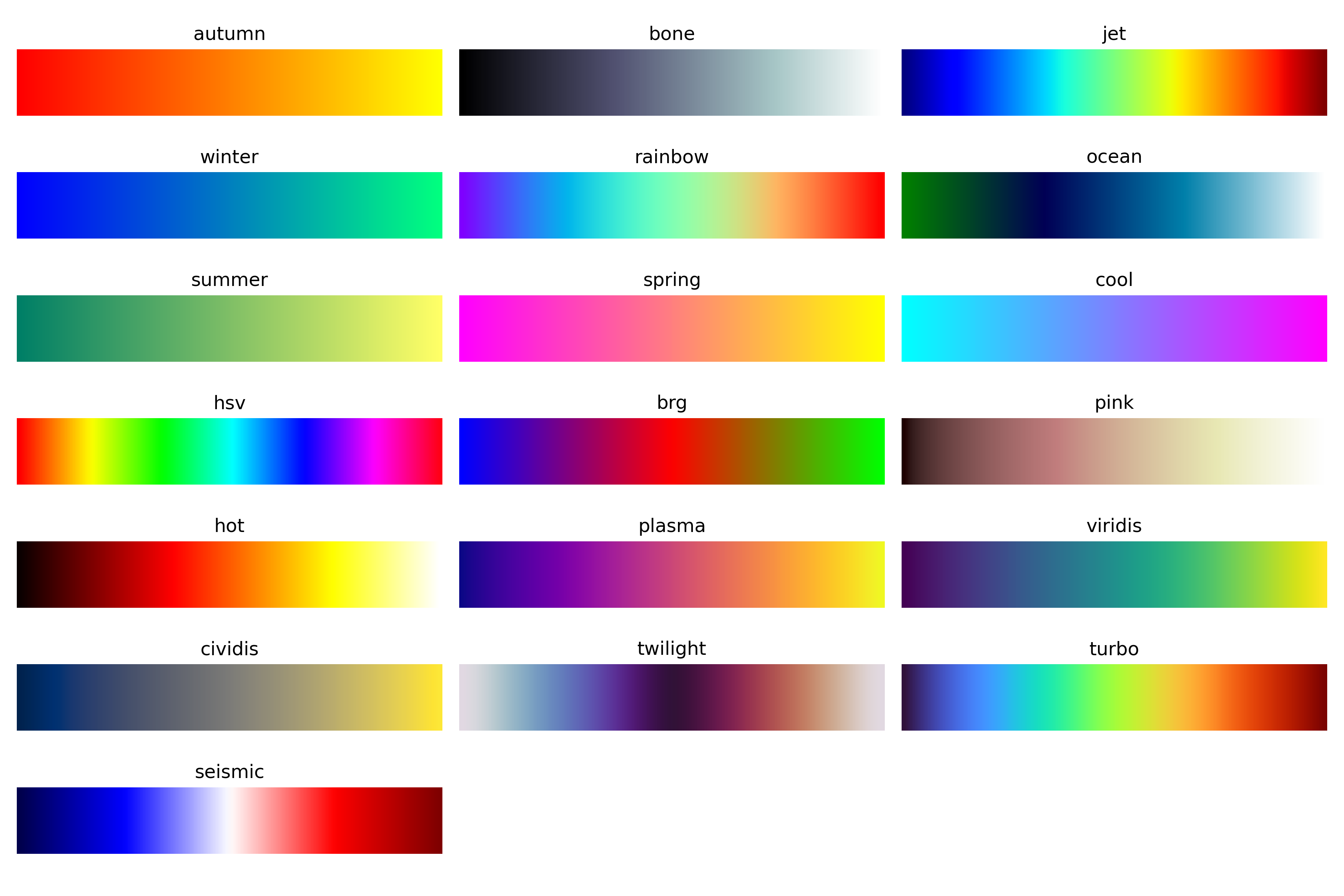
Color maps available:
- class kornia.color.ColorMapType(value)[source]#
An enumeration for available colormaps.
List of available colormaps:
- autumn = 1#
- bone = 2#
- jet = 3#
- winter = 4#
- rainbow = 5#
- ocean = 6#
- summer = 7#
- spring = 8#
- cool = 9#
- hsv = 10#
- brg = 11#
- pink = 12#
- hot = 13#
- plasma = 14#
- viridis = 15#
- cividis = 16#
- twilight = 17#
- turbo = 18#
- seismic = 19#