

2D mix transforms#
Transforms that combine several images of a batch (and their labels) into new samples.
- class kornia.augmentation.RandomCutMixV2(num_mix=1, cut_size=None, beta=None, same_on_batch=False, p=1.0, keepdim=False, data_keys=None, use_correct_lambda=False)[source]#
Apply CutMix augmentation to a batch of torch.Tensor images.

Implementation for CutMix: Regularization Strategy to Train Strong Classifiers with Localizable Features [YHO+19].
The function returns (inputs, labels), in which the inputs is the torch.Tensor that contains the mixup images while the labels is a \((\text{num_mixes}, B, 3)\) torch.Tensor that contains (label_permuted_batch, lambda) for each cutmix.
The implementation referred to the following repository: clovaai/CutMix-PyTorch.
- Parameters:
height – the width of the input image.
width – the width of the input image.
p (
float, optional) – probability for applying an augmentation to a batch. This param controls the augmentation probabilities batch-wisely. Default:1.0num_mix (
int, optional) – cut mix times. Default:1beta (
Union[Tensor,float,None], optional) – hyperparameter for generating cut size from beta distribution. Beta cannot be set to 0 after torch 1.8.0. If None, it will be set to 1. Default:Nonecut_size (
Union[Tensor,Tuple[float,float],None], optional) – controlling the minimum and maximum cut ratio from [0, 1]. If None, it will be set to [0, 1], which means no restriction. Default:Nonesame_on_batch (
bool, optional) – apply the same transformation across the batch. This flag will not maintain permutation order. Default:Falsekeepdim (
bool, optional) – whether to keep the output shape the same as input (True) or broadcast it to the batch form (False). Default:Falseuse_correct_lambda (
bool, optional) – if True, compute lambda according to the CutMix paper (lam = 1 - area_ratio). Defaults to False (lam = area_ratio) for backward compatibility, but will raise a deprecation warning when False. Default:False
- Inputs:
Input image tensors, shape of \((B, C, H, W)\).
Raw labels, shape of \((B)\).
- Returns:
Adjusted image, shape of \((B, C, H, W)\).
Raw labels, permuted labels and lambdas for each mix, shape of \((B, num_mix, 3)\).
- Return type:
Tuple[torch.Tensor, torch.Tensor]
Note
This implementation would randomly cutmix images in a batch. Ideally, the larger batch size would be preferred.
Examples
>>> rng = torch.manual_seed(3)
>>> input = torch.rand(2, 1, 3, 3)
>>> input[0] = torch.ones((1, 3, 3))
>>> label = torch.tensor([0, 1])
>>> cutmix = RandomCutMixV2(data_keys=["input", "class"], use_correct_lambda=True)
>>> cutmix(input, label)
[tensor([[[[0.8879, 0.4510, 1.0000],
          [0.1498, 0.4015, 1.0000],
          [1.0000, 1.0000, 1.0000]]],


        [[[1.0000, 1.0000, 0.7995],
          [1.0000, 1.0000, 0.0542],
          [0.4594, 0.1756, 0.9492]]]]), tensor([[[0.0000, 1.0000, 0.5556],
         [1.0000, 0.0000, 0.5556]]])]
- class kornia.augmentation.RandomJigsaw(grid=(4, 4), data_keys=None, p=0.5, same_on_batch=False, keepdim=False, ensure_perm=True)[source]#
RandomJigsaw augmentation.
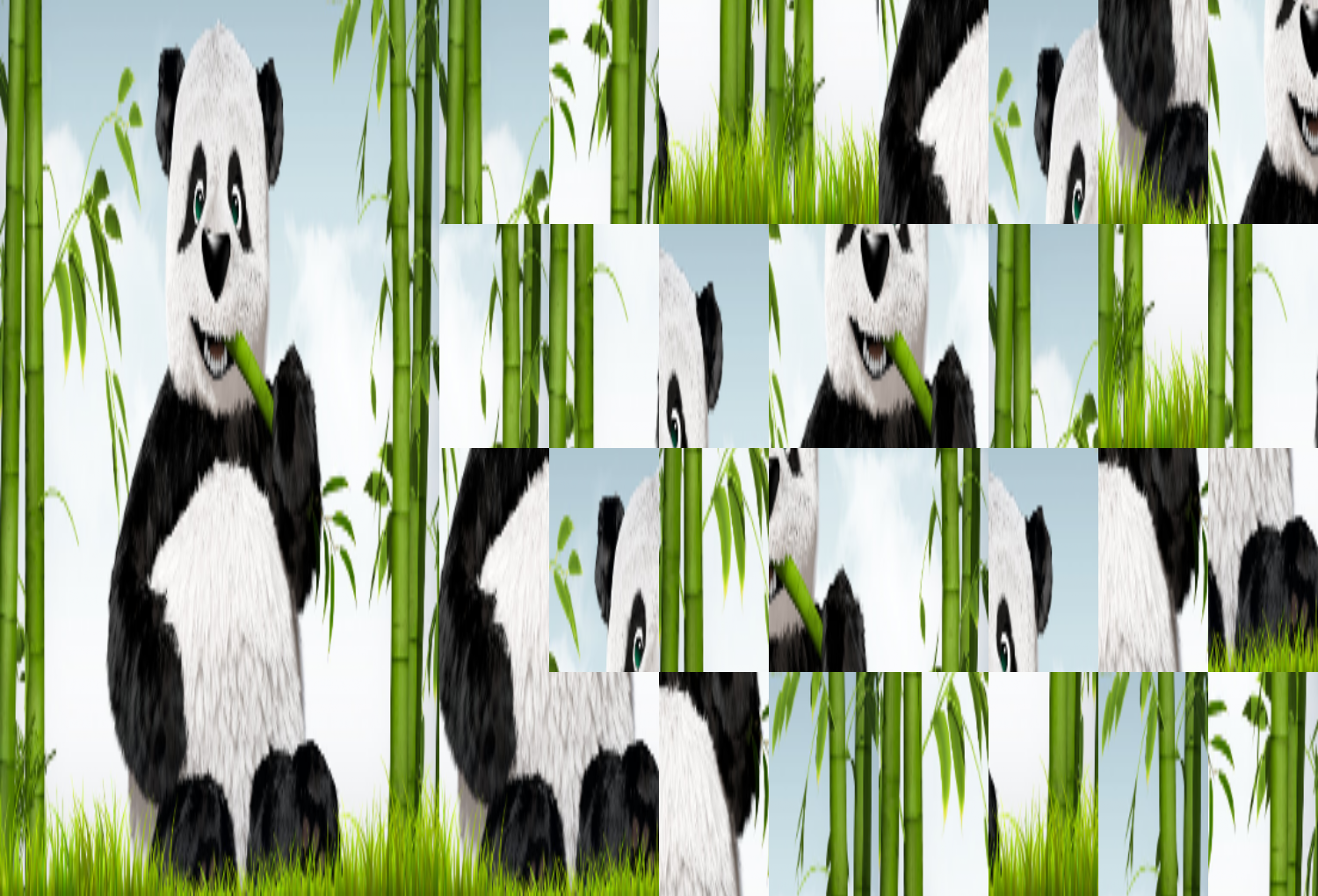
Make Jigsaw puzzles for each image individually. To mix with different images in a batch, referring to
kornia.augmentation.RandomMosic.- Parameters:
grid (
Tuple[int,int], optional) – the Jigsaw puzzle grid. e.g. (2, 2) means each output will mix image patches in a 2x2 grid. Default:(4, 4)ensure_perm (
bool, optional) – to ensure the nonidentical patch permutation generation against the original one. Default:Truedata_keys (
Optional[List[Union[str,int,DataKey]]], optional) – the input type sequential for applying augmentations. Accepts “input”, “image”, “mask”, “bbox”, “bbox_xyxy”, “bbox_xywh”, “keypoints”, “class”, “label”. Default:Nonep (
float, optional) – probability of applying the transformation for the whole batch. Default:0.5same_on_batch (
bool, optional) – apply the same transformation across the batch. Default:Falsekeepdim (
bool, optional) – whether to keep the output shape the same as inputTrueor broadcast it to the batch formFalse. Default:False
Examples
>>> jigsaw = RandomJigsaw((4, 4))
>>> input = torch.randn(8, 3, 256, 256)
>>> out = jigsaw(input)
>>> out.shape
torch.Size([8, 3, 256, 256])
- class kornia.augmentation.RandomMixUpV2(lambda_val=None, same_on_batch=False, p=1.0, keepdim=False, data_keys=None)[source]#
Apply MixUp augmentation to a batch of torch.Tensor images.

Implementation for mixup: BEYOND EMPIRICAL RISK MINIMIZATION [ZnYNDLP18].
The function returns (inputs, labels), in which the inputs is the torch.Tensor that contains the mixup images while the labels is a \((B, 3)\) torch.Tensor that contains (label_batch, label_permuted_batch, lambda) for each image.
The implementation is on top of the following repository: hongyi-zhang/mixup.
The loss and accuracy are computed as:
def loss_mixup(y, logits):
    criterion = F.cross_entropy
    loss_a = criterion(logits, y[:, 0].long(), reduction='none')
    loss_b = criterion(logits, y[:, 1].long(), reduction='none')
    return ((1 - y[:, 2]) * loss_a + y[:, 2] * loss_b).mean()
def acc_mixup(y, logits):
    pred = torch.argmax(logits, dim=1).to(y.device)
    return (1 - y[:, 2]) * pred.eq(y[:, 0]).float() + y[:, 2] * pred.eq(y[:, 1]).float()
- Parameters:
p (
float, optional) – probability for applying an augmentation to a batch. This param controls the augmentation probabilities batch-wisely. Default:1.0lambda_val (
Union[Tensor,Tuple[float,float],None], optional) – min-max value of mixup strength. Default is 0-1. Default:Nonesame_on_batch (
bool, optional) – apply the same transformation across the batch. This flag will not maintain permutation order. Default:Falsekeepdim (
bool, optional) – whether to keep the output shape the same as input (True) or broadcast it to the batch form (False). Default:False
- Inputs:
Input image tensors, shape of \((B, C, H, W)\).
Label: raw labels, shape of \((B)\).
- Returns:
Adjusted image, shape of \((B, C, H, W)\).
Raw labels, permuted labels and lambdas for each mix, shape of \((B, 3)\).
- Return type:
Tuple[torch.Tensor, torch.Tensor]
Note
This implementation would randomly mixup images in a batch. Ideally, the larger batch size would be preferred.
Examples
>>> rng = torch.manual_seed(1)
>>> input = torch.rand(2, 1, 3, 3)
>>> label = torch.tensor([0, 1])
>>> mixup = RandomMixUpV2(data_keys=["input", "class"])
>>> mixup(input, label)
[tensor([[[[0.7576, 0.2793, 0.4031],
          [0.7347, 0.0293, 0.7999],
          [0.3971, 0.7544, 0.5695]]],


        [[[0.4388, 0.6387, 0.5247],
          [0.6826, 0.3051, 0.4635],
          [0.4550, 0.5725, 0.4980]]]]), tensor([[0.0000, 0.0000, 0.1980],
        [1.0000, 1.0000, 0.4162]])]
- class kornia.augmentation.RandomMosaic(output_size=None, mosaic_grid=(2, 2), start_ratio_range=(0.3, 0.7), min_bbox_size=0.0, data_keys=None, p=0.7, keepdim=False, padding_mode='constant', resample=Resample.BILINEAR.name, align_corners=True, cropping_mode='slice')[source]#
Mosaic augmentation.
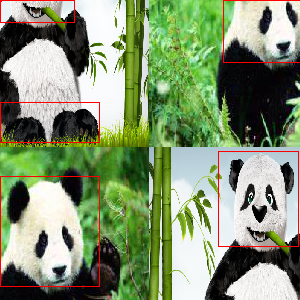
Given a certain number of images, mosaic transform combines them into one output image. The output image is composed of the parts from each sub-image. To mess up each image individually, referring to
kornia.augmentation.RandomJigsaw.The mosaic transform steps are as follows:
Concate selected images into a super-image.
Crop out the outcome image according to the top-left corner and crop size.
- Parameters:
output_size (
Optional[Tuple[int,int]], optional) – the output torch.Tensor width and height after mosaicing. Default:Nonestart_ratio_range (
Tuple[float,float], optional) – top-left (x, y) position for cropping the mosaic images. Default:(0.3, 0.7)mosaic_grid (
Tuple[int,int], optional) – the number of images and image arrangement. e.g. (2, 2) means each output will mix 4 images in a 2x2 grid. Default:(2, 2)min_bbox_size (
float, optional) – minimum area of bounding boxes. Default to 0. Default:0.0data_keys (
Optional[List[Union[str,int,DataKey]]], optional) – the input type sequential for applying augmentations. Accepts “input”, “image”, “mask”, “bbox”, “bbox_xyxy”, “bbox_xywh”, “keypoints”, “class”, “label”. Default:Nonep (
float, optional) – probability of applying the transformation for the whole batch. Default:0.7keepdim (
bool, optional) – whether to keep the output shape the same as inputTrueor broadcast it to the batch formFalse. Default:Falsepadding_mode (
str, optional) – Type of padding. Should be: constant, reflect, replicate. Default:"constant"resample (
Union[str,int,Resample], optional) – the interpolation mode. Default:Resample.BILINEAR.namealign_corners (
bool, optional) – interpolation flag. Default:Truecropping_mode (
str, optional) – The used algorithm to crop.slicewill use advanced slicing to extract the torch.Tensor based on the sampled indices.resamplewill use warp_affine using the affine transformation to extract and resize at once. Use slice for efficiency, or resample for proper differentiability. Default:"slice"
Examples
>>> mosaic = RandomMosaic((300, 300), data_keys=["input", "bbox_xyxy"])
>>> boxes = torch.tensor([[
...     [70, 5, 150, 100],
...     [60, 180, 175, 220],
... ]]).repeat(8, 1, 1)
>>> input = torch.randn(8, 3, 224, 224)
>>> out = mosaic(input, boxes)
>>> out[0].shape, out[1].shape
(torch.Size([8, 3, 300, 300]), torch.Size([8, 8, 4]))
- class kornia.augmentation.RandomTransplantation(excluded_labels=None, p=0.5, p_batch=1.0, data_keys=None)[source]#
RandomTransplantation augmentation.

Randomly transplant (copy and paste) image features and corresponding segmentation masks between images in a batch. The transplantation transform works as follows:
Based on the parameter p, a certain number of images in the batch are selected as acceptor of a transplantation.
For each acceptor, the image below in the batch is selected as donor (via circling: \(i - 1 \mod B\)).
From the donor, a random label is selected and the corresponding image features and segmentation mask are transplanted to the acceptor.
The augmentation is described in Semantic segmentation of surgical hyperspectral images under geometric domain shifts [SSSF+23].
- Parameters:
excluded_labels (
Union[Sequence[int],Tensor,None], optional) – sequence of labels which should not be transplanted from a donor. This can be useful if only parts of the image are annotated and the non-annotated regions (with a specific label index) should be excluded from the augmentation. If no label is left in the donor image, nothing is transplanted. Default:Nonep (
float, optional) – probability for applying an augmentation to an image. This parameter controls how many images in a batch receive a transplant. Default:0.5p_batch (
float, optional) – probability for applying an augmentation to a batch. This param controls the augmentation probabilities batch-wise. Default:1.0data_keys (
Optional[list[str|int|DataKey]], optional) – the input type sequential for applying augmentations. There must be at least one “mask” torch.Tensor. If no data keys are given, the first torch.Tensor is assumed to be DataKey.INPUT and the second torch.Tensor DataKey.MASK. Accepts “input”, “mask”. Default:None
Note
This augmentation requires that segmentation masks are available for all images in the batch and that at least some objects in the image are annotated.
When using this class directly (RandomTransplantation()(…)), it works for arbitrary spatial dimensions including 2D and 3D images. When wrapping in
kornia.augmentation.AugmentationSequential, usekornia.augmentation.RandomTransplantationfor 2D andkornia.augmentation.RandomTransplantation3Dfor 3D images.
- Inputs:
Segmentation mask torch.Tensor which is used to determine the objects for transplantation: \((B, *)\).
(optional) Additional image or mask tensors where the features are transplanted based on the first segmentation mask: \((B, C, *)\) (DataKey.INPUT) or \((B, *)\) (DataKey.MASK).
- Returns:
- torch.Tensor:
Augmented mask tensors: \((B, *)\).
- list[torch.Tensor]:
Augmented mask tensors: \((B, *)\).
Additional augmented image or mask tensors: \((B, C, *)\) (DataKey.INPUT) or \((B, *)\) (DataKey.MASK).
- Return type:
Examples
>>> import torch
>>> rng = torch.manual_seed(0)
>>> aug = RandomTransplantation(p=1.)
>>> image = torch.randn(2, 3, 5, 5)
>>> mask = torch.randint(0, 3, (2, 5, 5))
>>> mask
tensor([[[0, 0, 1, 1, 0],
         [1, 2, 0, 0, 0],
         [1, 2, 1, 1, 0],
         [0, 0, 0, 0, 2],
         [2, 2, 2, 0, 2]],

        [[2, 0, 0, 2, 1],
         [2, 1, 0, 2, 1],
         [2, 0, 1, 0, 2],
         [2, 2, 2, 0, 2],
         [2, 1, 0, 0, 0]]])
>>> image_out, mask_out = aug(image, mask)
>>> image_out.shape
torch.Size([2, 3, 5, 5])
>>> mask_out.shape
torch.Size([2, 5, 5])
>>> mask_out
tensor([[[2, 0, 1, 2, 0],
         [2, 2, 0, 2, 0],
         [2, 2, 1, 1, 2],
         [2, 2, 2, 0, 2],
         [2, 2, 2, 0, 2]],

        [[0, 0, 0, 2, 0],
         [2, 1, 0, 0, 0],
         [2, 0, 1, 0, 0],
         [0, 0, 0, 0, 2],
         [2, 1, 0, 0, 0]]])
>>> aug._params["selected_labels"]  # Image 0 received label 2 from image 1 and image 1 label 0 from image 0
tensor([2, 0])
You can apply the same augmentation again in which case the same objects get transplanted between the images:
>>> aug._params["selection"]  # The pixels (objects) which get transplanted
tensor([[[ True, False, False,  True, False],
         [ True, False, False,  True, False],
         [ True, False, False, False,  True],
         [ True,  True,  True, False,  True],
         [ True, False, False, False, False]],

        [[ True,  True, False, False,  True],
         [False, False,  True,  True,  True],
         [False, False, False, False,  True],
         [ True,  True,  True,  True, False],
         [False, False, False,  True, False]]])
>>> image2 = torch.zeros(2, 3, 5, 5)
>>> image2[1] = 1
>>> image2[:, 0]
tensor([[[0., 0., 0., 0., 0.],
         [0., 0., 0., 0., 0.],
         [0., 0., 0., 0., 0.],
         [0., 0., 0., 0., 0.],
         [0., 0., 0., 0., 0.]],

        [[1., 1., 1., 1., 1.],
         [1., 1., 1., 1., 1.],
         [1., 1., 1., 1., 1.],
         [1., 1., 1., 1., 1.],
         [1., 1., 1., 1., 1.]]])
>>> image_out2, mask_out2 = aug(image2, mask, params=aug._params)
>>> image_out2[:, 0]
tensor([[[1., 0., 0., 1., 0.],
         [1., 0., 0., 1., 0.],
         [1., 0., 0., 0., 1.],
         [1., 1., 1., 0., 1.],
         [1., 0., 0., 0., 0.]],

        [[0., 0., 1., 1., 0.],
         [1., 1., 0., 0., 0.],
         [1., 1., 1., 1., 0.],
         [0., 0., 0., 0., 1.],
         [1., 1., 1., 0., 1.]]])