

2D intensity transforms#
Transforms that change pixel values but keep every pixel where it is, so masks, boxes and keypoints pass through unchanged.
- class kornia.augmentation.ColorJiggle(brightness=0.0, contrast=0.0, saturation=0.0, hue=0.0, same_on_batch=False, p=1.0, keepdim=False)[source]#
Apply a random transformation to the brightness, contrast, saturation and hue of a torch.Tensor image.

- Parameters:
p (
float, optional) – probability of applying the transformation. Default:1.0brightness (
Union[Tensor,float,Tuple[float,float],List[float]], optional) – The brightness factor to apply. Default:0.0contrast (
Union[Tensor,float,Tuple[float,float],List[float]], optional) – The contrast factor to apply. Default:0.0saturation (
Union[Tensor,float,Tuple[float,float],List[float]], optional) – The saturation factor to apply. Default:0.0hue (
Union[Tensor,float,Tuple[float,float],List[float]], optional) – The hue factor to apply. Default:0.0same_on_batch (
bool, optional) – apply the same transformation across the batch. Default:Falsekeepdim (
bool, optional) – whether to keep the output shape the same as input (True) or broadcast it to the batch form (False). Default:False
- Shape:
Input: \((C, H, W)\) or \((B, C, H, W)\), Optional: \((B, 3, 3)\)
Output: \((B, C, H, W)\)
Note
This function internally uses
kornia.enhance.adjust_brightness(),kornia.enhance.adjust_contrast().kornia.enhance.adjust_saturation(),kornia.enhance.adjust_hue().Examples
>>> rng = torch.manual_seed(0)
>>> inputs = torch.ones(1, 3, 3, 3)
>>> aug = ColorJiggle(0.1, 0.1, 0.1, 0.1, p=1.)
>>> aug(inputs)
tensor([[[[0.9993, 0.9993, 0.9993],
          [0.9993, 0.9993, 0.9993],
          [0.9993, 0.9993, 0.9993]],

         [[0.9993, 0.9993, 0.9993],
          [0.9993, 0.9993, 0.9993],
          [0.9993, 0.9993, 0.9993]],

         [[0.9993, 0.9993, 0.9993],
          [0.9993, 0.9993, 0.9993],
          [0.9993, 0.9993, 0.9993]]]])
- To apply the exact augmenation again, you may take the advantage of the previous parameter state:
>>> input = torch.randn(1, 3, 32, 32)
>>> aug = ColorJiggle(0.1, 0.1, 0.1, 0.1, p=1.)
>>> (aug(input) == aug(input, params=aug._params)).all()
tensor(True)
- class kornia.augmentation.ColorJitter(brightness=0.0, contrast=0.0, saturation=0.0, hue=0.0, same_on_batch=False, p=1.0, keepdim=False, order=None)[source]#
Apply a random transformation to the brightness, contrast, saturation and hue of a torch.Tensor image.
This implementation aligns PIL. Hence, the output is close to TorchVision. However, it does not follow the color theory and is not be actively maintained. Prefer using
kornia.augmentation.ColorJiggle()
- Parameters:
brightness (
Union[Tensor,float,Tuple[float,float],List[float]], optional) – The brightness factor to apply. Default:0.0contrast (
Union[Tensor,float,Tuple[float,float],List[float]], optional) – The contrast factor to apply. Default:0.0saturation (
Union[Tensor,float,Tuple[float,float],List[float]], optional) – The saturation factor to apply. Default:0.0hue (
Union[Tensor,float,Tuple[float,float],List[float]], optional) – The hue factor to apply. Default:0.0silence_instantiation_warning – if True, silence the warning at instantiation.
same_on_batch (
bool, optional) – apply the same transformation across the batch. Default:Falsep (
float, optional) – probability of applying the transformation. Default:1.0keepdim (
bool, optional) – whether to keep the output shape the same as input (True) or broadcast it to the batch form (False). Default:False
- Shape:
Input: \((C, H, W)\) or \((B, C, H, W)\), Optional: \((B, 3, 3)\)
Output: \((B, C, H, W)\)
Note
This function internally uses
kornia.enhance.adjust_brightness_accumulative(),kornia.enhance.adjust_contrast_with_mean_subtraction(),kornia.enhance.adjust_saturation_with_gray_subtraction(),kornia.enhance.adjust_hue().Examples
>>> rng = torch.manual_seed(0)
>>> inputs = torch.ones(1, 3, 3, 3)
>>> aug = ColorJitter(0.1, 0.1, 0.1, 0.1, p=1.)
>>> aug(inputs)
tensor([[[[0.9993, 0.9993, 0.9993],
          [0.9993, 0.9993, 0.9993],
          [0.9993, 0.9993, 0.9993]],

         [[0.9993, 0.9993, 0.9993],
          [0.9993, 0.9993, 0.9993],
          [0.9993, 0.9993, 0.9993]],

         [[0.9993, 0.9993, 0.9993],
          [0.9993, 0.9993, 0.9993],
          [0.9993, 0.9993, 0.9993]]]])
To apply the exact augmenation again, you may take the advantage of the previous parameter state:
>>> input = torch.randn(1, 3, 32, 32)
>>> aug = ColorJitter(0.1, 0.1, 0.1, 0.1, p=1.)
>>> (aug(input) == aug(input, params=aug._params)).all()
tensor(True)
- class kornia.augmentation.RandomAutoContrast(clip_output=True, same_on_batch=False, p=1.0, keepdim=False)[source]#
Apply a random auto-contrast of a torch.Tensor image.
- Parameters:
p (
float, optional) – probability of applying the transformation. Default:1.0clip_output (
bool, optional) – if true clip output Default:Truesame_on_batch (
bool, optional) – apply the same transformation across the batch. Default:Falsekeepdim (
bool, optional) – whether to keep the output shape the same as input (True) or broadcast it to the batch form (False). Default:False
- Shape:
Input: \((C, H, W)\) or \((B, C, H, W)\)
Output: \((B, C, H, W)\)
Note
This function internally uses
kornia.enhance.normalize_min_max()
- class kornia.augmentation.RandomBoxBlur(kernel_size=(3, 3), border_type='reflect', normalized=True, same_on_batch=False, p=0.5, keepdim=False)[source]#
Add random blur with a box filter to an image tensor.

- Parameters:
kernel_size (
Tuple[int,int], optional) – the blurring kernel size. Default:(3, 3)border_type (
str, optional) – the padding mode to be applied before convolving. The expected modes are:constant,reflect,replicateorcircular. Default:"reflect"normalized (
bool, optional) – if True, L1 norm of the kernel is set to 1. Default:Truesame_on_batch (
bool, optional) – apply the same transformation across the batch. Default:Falsep (
float, optional) – probability of applying the transformation. Default:0.5keepdim (
bool, optional) – whether to keep the output shape the same as input (True) or broadcast it to the batch form (False). Default:False
Note
This function internally uses
kornia.filters.box_blur().Examples
>>> img = torch.ones(1, 1, 24, 24)
>>> out = RandomBoxBlur((7, 7))(img)
>>> out.shape
torch.Size([1, 1, 24, 24])
- To apply the exact augmenation again, you may take the advantage of the previous parameter state:
>>> input = torch.randn(1, 3, 32, 32)
>>> aug = RandomBoxBlur((7, 7), p=1.)
>>> (aug(input) == aug(input, params=aug._params)).all()
tensor(True)
- class kornia.augmentation.RandomBrightness(brightness=(1.0, 1.0), clip_output=True, same_on_batch=False, p=1.0, keepdim=False)[source]#
Apply a random transformation to the brightness of a torch.Tensor image.
This implementation aligns PIL. Hence, the output is close to TorchVision.

- Parameters:
brightness (
Tuple[float,float], optional) – the brightness factor to apply Default:(1.0, 1.0)clip_output (
bool, optional) – if true clip output Default:Truesilence_instantiation_warning – if True, silence the warning at instantiation.
same_on_batch (
bool, optional) – apply the same transformation across the batch. Default:Falsep (
float, optional) – probability of applying the transformation. Default:1.0keepdim (
bool, optional) – whether to keep the output shape the same as input (True) or broadcast it to the batch form (False). Default:False
- Shape:
Input: \((C, H, W)\) or \((B, C, H, W)\), Optional: \((B, 3, 3)\)
Output: \((B, C, H, W)\)
Note
This function internally uses
kornia.enhance.adjust_brightness()Examples
>>> rng = torch.manual_seed(0)
>>> inputs = torch.rand(1, 3, 3, 3)
>>> aug = RandomBrightness(brightness = (0.5,2.),p=1.)
>>> aug(inputs)
tensor([[[[0.0505, 0.3225, 0.0000],
          [0.0000, 0.0000, 0.1883],
          [0.0443, 0.4507, 0.0099]],

         [[0.1866, 0.0000, 0.0000],
          [0.0000, 0.0000, 0.0000],
          [0.0728, 0.2519, 0.3543]],

         [[0.0000, 0.0000, 0.2359],
          [0.4694, 0.0000, 0.4284],
          [0.0000, 0.1072, 0.5070]]]])
To apply the exact augmenation again, you may take the advantage of the previous parameter state:
>>> input = torch.rand(1, 3, 32, 32)
>>> aug = RandomBrightness((0.8,1.2), p=1.)
>>> (aug(input) == aug(input, params=aug._params)).all()
tensor(True)
- class kornia.augmentation.RandomChannelDropout(num_drop_channels=1, fill_value=0.0, same_on_batch=False, p=0.5, keepdim=False)[source]#
Apply random channel dropout to a batch of images.

- Parameters:
num_drop_channels (
int, optional) – Number of channels to drop randomly. Default is 1. Default:1fill_value (
float, optional) – Value to fill the dropped channels with. Default is 0.0. Default:0.0same_on_batch (
bool, optional) – Apply the same transformation across the batch. Defaults to False. Default:Falsep (
float, optional) – Probability of applying the transformation. Defaults to 0.5. Default:0.5keepdim (
bool, optional) – Whether to keep the output shape the same as inputTrueor broadcast it to the batch formFalse. Defaults to False. Default:False
- Shape:
Input: \((C, H, W)\) or \((B, C, H, W)\)
Output: \((C, H, W)\) or \((B, C, H, W)\)
Note
- If num_drop_channels is set to 1, it means that for each image in the batch,
we will randomly choose one channel to drop.
- If num_drop_channels is set to 2, it means that for each image in the batch,
we will randomly choose two channels to drop.
- If num_drop_channels is set to 3, it means that for each image in the batch,
we will randomly choose three channels to drop (all image).
Examples
>>> rng = torch.manual_seed(1)
>>> img = torch.ones(1, 3, 3, 3)
>>> aug = RandomChannelDropout(num_drop_channels=1, fill_value=0.0, p=1.0)
>>> aug(img)
tensor([[[[1., 1., 1.],
          [1., 1., 1.],
          [1., 1., 1.]],

         [[0., 0., 0.],
          [0., 0., 0.],
          [0., 0., 0.]],

         [[1., 1., 1.],
          [1., 1., 1.],
          [1., 1., 1.]]]])
- To apply the exact augmenation again, you may take the advantage of the previous parameter state:
>>> input = torch.rand(1, 3, 32, 32)
>>> aug = RandomChannelDropout(num_drop_channels=1, fill_value=0.0, p=1.0)
>>> (aug(input) == aug(input, params=aug._params)).all()
tensor(True)
- class kornia.augmentation.RandomChannelShuffle(same_on_batch=False, p=0.5, keepdim=False)[source]#
Shuffle the channels of a batch of multi-dimensional images.

- Parameters:
same_on_batch (
bool, optional) – apply the same transformation across the batch. Default:Falsep (
float, optional) – probability of applying the transformation. Default:0.5keepdim (
bool, optional) – whether to keep the output shape the same as inputTrueor broadcast it to the batch formFalse. Default:False
Examples
>>> rng = torch.manual_seed(0)
>>> img = torch.arange(1*2*2*2.).view(1,2,2,2)
>>> RandomChannelShuffle()(img)
tensor([[[[4., 5.],
          [6., 7.]],

         [[0., 1.],
          [2., 3.]]]])
- To apply the exact augmenation again, you may take the advantage of the previous parameter state:
>>> input = torch.randn(1, 3, 32, 32)
>>> aug = RandomChannelShuffle(p=1.)
>>> (aug(input) == aug(input, params=aug._params)).all()
tensor(True)
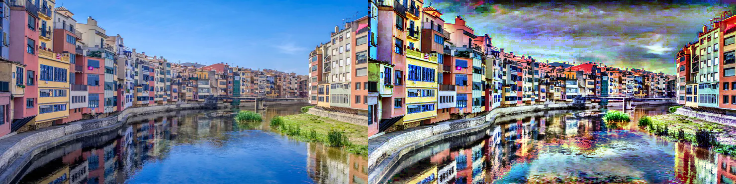
- class kornia.augmentation.RandomClahe(clip_limit=(40.0, 40.0), grid_size=(8, 8), slow_and_differentiable=False, same_on_batch=False, p=0.5, keepdim=False)[source]#
Apply CLAHE equalization on the input torch.Tensor randomly.
- Parameters:
clip_limit (
tuple[float,float], optional) – threshold value for contrast limiting. If 0 clipping is disabled. Default:(40.0, 40.0)grid_size (
tuple[int,int], optional) – number of tiles to be cropped in each direction (GH, GW). Default:(8, 8)slow_and_differentiable (
bool, optional) – flag to select implementation Default:Falsesame_on_batch (
bool, optional) – apply the same transformation across the batch. Default:Falsep (
float, optional) – probability of applying the transformation. Default:0.5keepdim (
bool, optional) – whether to keep the output shape the same as input (True) or broadcast it to the batch form (False). Default:False
Note
This function internally uses
kornia.enhance.equalize_clahe().Examples
>>> img = torch.rand(1, 10, 20)
>>> aug = RandomClahe()
>>> res = aug(img)
>>> res.shape
torch.Size([1, 1, 10, 20])
>>> img = torch.rand(2, 3, 10, 20)
>>> aug = RandomClahe()
>>> res = aug(img)
>>> res.shape
torch.Size([2, 3, 10, 20])
- To apply the exact augmenation again, you may take the advantage of the previous parameter state:
>>> input = torch.rand(1, 3, 32, 32)
>>> aug = RandomClahe(p=1.)
>>> (aug(input) == aug(input, params=aug._params)).all()
tensor(True)
- class kornia.augmentation.RandomContrast(contrast=(1.0, 1.0), clip_output=True, same_on_batch=False, p=1.0, keepdim=False)[source]#
Apply a random transformation to the contrast of a torch.Tensor image.
This implementation aligns PIL. Hence, the output is close to TorchVision.

- Parameters:
contrast (
Tuple[float,float], optional) – the contrast factor to apply. Default:(1.0, 1.0)clip_output (
bool, optional) – if true clip output. Default:Truesame_on_batch (
bool, optional) – apply the same transformation across the batch. Default:Falsep (
float, optional) – probability of applying the transformation. Default:1.0keepdim (
bool, optional) – whether to keep the output shape the same as input (True) or broadcast it to the batch form (False). Default:False
- Shape:
Input: \((C, H, W)\) or \((B, C, H, W)\), Optional: \((B, 3, 3)\)
Output: \((B, C, H, W)\)
Note
This function internally uses
kornia.enhance.adjust_contrast()Examples
>>> rng = torch.manual_seed(0)
>>> inputs = torch.rand(1, 3, 3, 3)
>>> aug = RandomContrast(contrast = (0.5, 2.), p = 1.)
>>> aug(inputs)
tensor([[[[0.2750, 0.4258, 0.0490],
          [0.0732, 0.1704, 0.3514],
          [0.2716, 0.4969, 0.2525]],

         [[0.3505, 0.1934, 0.2227],
          [0.0124, 0.0936, 0.1629],
          [0.2874, 0.3867, 0.4434]],

         [[0.0893, 0.1564, 0.3778],
          [0.5072, 0.2201, 0.4845],
          [0.2325, 0.3064, 0.5281]]]])
To apply the exact augmenation again, you may take the advantage of the previous parameter state:
>>> input = torch.rand(1, 3, 32, 32)
>>> aug = RandomContrast((0.8,1.2), p=1.)
>>> (aug(input) == aug(input, params=aug._params)).all()
tensor(True)
- class kornia.augmentation.RandomEqualize(same_on_batch=False, p=0.5, keepdim=False)[source]#
Equalize given tensor image or a batch of tensor images randomly.

- Parameters:
p (
float, optional) – Probability to equalize an image. Default:0.5same_on_batch (
bool, optional) – apply the same transformation across the batch. Default:Falsekeepdim (
bool, optional) – whether to keep the output shape the same as input (True) or broadcast it to the batch form (False). Default:False
- Shape:
Input: \((C, H, W)\) or \((B, C, H, W)\), Optional: \((B, 3, 3)\)
Output: \((B, C, H, W)\)
Note
This function internally uses
kornia.enhance.equalize().Examples
>>> rng = torch.manual_seed(0)
>>> input = torch.rand(1, 1, 5, 5)
>>> equalize = RandomEqualize(p=1.)
>>> equalize(input)
tensor([[[[0.4963, 0.7682, 0.0885, 0.1320, 0.3074],
          [0.6341, 0.4901, 0.8964, 0.4556, 0.6323],
          [0.3489, 0.4017, 0.0223, 0.1689, 0.2939],
          [0.5185, 0.6977, 0.8000, 0.1610, 0.2823],
          [0.6816, 0.9152, 0.3971, 0.8742, 0.4194]]]])
- To apply the exact augmenation again, you may take the advantage of the previous parameter state:
>>> input = torch.rand(1, 3, 32, 32)
>>> aug = RandomEqualize(p=1.)
>>> (aug(input) == aug(input, params=aug._params)).all()
tensor(True)
- class kornia.augmentation.RandomDissolving(step_range=(100, 500), version='1.5', p=0.5, keepdim=False, **kwargs)[source]#
Perform dissolving transformation using StableDiffusion models.
Based on [SZZ+24], the dissolving transformation is essentially applying one-step reverse diffusion. Our implementation currently supports HuggingFace implementations of SD 1.4, 1.5 and 2.1. SD 1.X tends to remove more details than SD2.1.
Title# SD 1.4
SD 1.5
SD xl
figure:: https://raw.githubusercontent.com/kornia/data/main/dslv-sd-1.4.png
figure:: https://raw.githubusercontent.com/kornia/data/main/dslv-sd-1.5.png
figure:: https://raw.githubusercontent.com/kornia/data/main/dslv-sd-2.1.png
- Parameters:
p (
float, optional) – probability of applying the transformation. Default:0.5version (
str, optional) – the version of the stable diffusion model. Default:"1.5"step_range (
Tuple[float,float], optional) – the step range of the diffusion model steps. Higher the step, stronger the dissolving effects. Default:(100, 500)keepdim (
bool, optional) – whether to keep the output shape the same as input (True) or broadcast it to the batch form (False). Default:False**kwargs (
Any) – additional arguments for .from_pretrained for HF StableDiffusionPipeline.
- Shape:
Input: \((C, H, W)\) or \((B, C, H, W)\).
Output: \((B, C, H, W)\)


- class kornia.augmentation.RandomGamma(gamma=(1.0, 1.0), gain=(1.0, 1.0), same_on_batch=False, p=1.0, keepdim=False)[source]#
Apply a random transformation to the gamma of a torch.Tensor image.
This implementation aligns PIL. Hence, the output is close to TorchVision.

- Parameters:
p (
float, optional) – probability of applying the transformation. Default:1.0gamma (
Tuple[float,float], optional) – the gamma factor to apply. Default:(1.0, 1.0)gain (
Tuple[float,float], optional) – the gain factor to apply. Default:(1.0, 1.0)same_on_batch (
bool, optional) – apply the same transformation across the batch. Default:Falsekeepdim (
bool, optional) – whether to keep the output shape the same as input (True) or broadcast it to the batch form (False). Default:False
- Shape:
Input: \((C, H, W)\) or \((B, C, H, W)\), Optional: \((B, 3, 3)\)
Output: \((B, C, H, W)\)
Note
This function internally uses
kornia.enhance.adjust_gamma()Examples
>>> rng = torch.manual_seed(0)
>>> inputs = torch.rand(1, 3, 3, 3)
>>> aug = RandomGamma((0.5,2.),(1.5,1.5),p=1.)
>>> aug(inputs)
tensor([[[[1.0000, 1.0000, 0.3912],
          [0.4883, 0.7801, 1.0000],
          [1.0000, 1.0000, 0.9702]],

         [[1.0000, 0.8368, 0.9048],
          [0.1824, 0.5597, 0.7609],
          [1.0000, 1.0000, 1.0000]],

         [[0.5452, 0.7441, 1.0000],
          [1.0000, 0.8990, 1.0000],
          [0.9267, 1.0000, 1.0000]]]])
- To apply the exact augmenation again, you may take the advantage of the previous parameter state:
>>> input = torch.rand(1, 3, 32, 32)
>>> aug = RandomGamma((0.8,1.2), p=1.)
>>> (aug(input) == aug(input, params=aug._params)).all()
tensor(True)
- class kornia.augmentation.RandomGaussianBlur(kernel_size, sigma, border_type='reflect', separable=True, same_on_batch=False, p=0.5, keepdim=False)[source]#
Apply gaussian blur given tensor image or a batch of tensor images randomly.
The standard deviation is sampled for each instance.

- Parameters:
kernel_size (
Union[Tuple[int,int],int]) – the size of the kernel.sigma (
Union[Tuple[float,float],Tensor]) – the range for the standard deviation of the kernel.border_type (
str, optional) – the padding mode to be applied before convolving. The expected modes are:constant,reflect,replicateorcircular. Default:"reflect"separable (
bool, optional) – run as composition of two 1d-convolutions. Default:Truesame_on_batch (
bool, optional) – apply the same transformation across the batch. Default:Falsep (
float, optional) – probability of applying the transformation. Default:0.5keepdim (
bool, optional) – whether to keep the output shape the same as input (True) or broadcast it to the batch form (False). Default:Falsesilence_instantiation_warning – if True, silence the warning at instantiation.
- Shape:
Input: \((C, H, W)\) or \((B, C, H, W)\), Optional: \((B, 3, 3)\)
Output: \((B, C, H, W)\)
Note
This function internally uses
kornia.filters.gaussian_blur2d().Examples
>>> rng = torch.manual_seed(0)
>>> input = torch.rand(1, 1, 5, 5)
>>> blur = RandomGaussianBlur((3, 3), (0.1, 2.0), p=1.)
>>> blur(input)
tensor([[[[0.5941, 0.5833, 0.5022, 0.4384, 0.3934],
          [0.5310, 0.4964, 0.4113, 0.3637, 0.3472],
          [0.4991, 0.4997, 0.4312, 0.3620, 0.3081],
          [0.6082, 0.5667, 0.4954, 0.3825, 0.3508],
          [0.7042, 0.6849, 0.6275, 0.4753, 0.4105]]]])
- To apply the exact augmenation again, you may take the advantage of the previous parameter state:
>>> input = torch.randn(1, 3, 32, 32)
>>> aug = RandomGaussianBlur((3, 3), (0.1, 2.0), p=1.)
>>> (aug(input) == aug(input, params=aug._params)).all()
tensor(True)
- class kornia.augmentation.RandomGaussianIllumination(gain=(0.01, 0.15), center=(0.1, 0.9), sigma=(0.2, 1.0), sign=(-1.0, 1.0), p=0.5, same_on_batch=False, keepdim=False)[source]#
Applies random 2D Gaussian illumination patterns to a batch of images.

- Parameters:
gain (
Union[float,Tuple[float,float],None], optional) – Range for the gain factor (intensity) applied to the generated illumination. Default:(0.01, 0.15)center (
Union[float,Tuple[float,float],None], optional) – The center coordinates of the Gaussian distribution are expressed as a Default:(0.1, 0.9)dimensions (percentage of the spatial) – math:(H, W).
sigma (
Union[float,Tuple[float,float],None], optional) – The sigma values (standard deviation) of the Gaussian distribution are expressed as a Default:(0.2, 1.0)dimensions – math:(H, W).
sign (
Union[float,Tuple[float,float],None], optional) – Range for the sign of the Gaussian distribution. If only one sign is needed, Default:(-1.0, 1.0)float. (insert only as a tuple or)
p (
float, optional) – Probability of applying the transformation. Default:0.5same_on_batch (
bool, optional) – If True, apply the same transformation across the entire batch. Default is False. Default:Falsekeepdim (
bool, optional) – whether to keep the output shape the same as input (True) or broadcast it to the batch form (False). Default:False
- Shape:
Input: \((C, H, W)\) or \((B, C, H, W)\)
Output: \((B, C, H, W)\)
Note
The generated random numbers are not reproducible across different devices and dtypes. By default, the parameters will be generated on CPU. This can be changed by calling
self.set_rng_device_and_dtype(device="cuda", dtype=torch.float64).Examples
>>> rng = torch.manual_seed(1)
>>> input = torch.ones(1, 3, 3, 3) * 0.5
>>> aug = RandomGaussianIllumination(gain=0.5, p=1.)
>>> aug(input)
tensor([[[[0.7266, 1.0000, 0.7266],
          [0.6621, 0.9121, 0.6621],
          [0.5000, 0.6911, 0.5000]],

         [[0.7266, 1.0000, 0.7266],
          [0.6621, 0.9121, 0.6621],
          [0.5000, 0.6911, 0.5000]],

         [[0.7266, 1.0000, 0.7266],
          [0.6621, 0.9121, 0.6621],
          [0.5000, 0.6911, 0.5000]]]])
- To apply the exact augmenation again, you may take the advantage of the previous parameter state:
>>> input = torch.rand(1, 3, 32, 32)
>>> aug = RandomGaussianIllumination(p=1.)
>>> (aug(input) == aug(input, params=aug._params)).all()
tensor(True)
- class kornia.augmentation.RandomGaussianNoise(mean=0.0, std=1.0, same_on_batch=False, p=0.5, keepdim=False)[source]#
Add gaussian noise to a batch of multi-dimensional images.

- Parameters:
mean (
float, optional) – The mean of the gaussian distribution. Default:0.0std (
float, optional) – The standard deviation of the gaussian distribution. Default:1.0same_on_batch (
bool, optional) – apply the same transformation across the batch. Default:Falsep (
float, optional) – probability of applying the transformation. Default:0.5keepdim (
bool, optional) – whether to keep the output shape the same as input (True) or broadcast it to the batch form (False). Default:False
Examples
>>> rng = torch.manual_seed(0)
>>> img = torch.ones(1, 1, 2, 2)
>>> RandomGaussianNoise(mean=0., std=1., p=1.)(img)
tensor([[[[ 2.5410,  0.7066],
          [-1.1788,  1.5684]]]])
- To apply the exact augmenation again, you may take the advantage of the previous parameter state:
>>> input = torch.randn(1, 3, 32, 32)
>>> aug = RandomGaussianNoise(mean=0., std=1., p=1.)
>>> (aug(input) == aug(input, params=aug._params)).all()
tensor(True)
- class kornia.augmentation.RandomGrayscale(rgb_weights=None, same_on_batch=False, p=0.1, keepdim=False)[source]#
Apply random transformation to Grayscale according to a probability p value.

Works for multispectral imagery too (e.g. satellite data with 4-13+ bands): for a non-RGB channel count the grayscale is the weighted average across all channels, broadcast back to the input channel count. This makes the augmentation usable outside the 3-channel RGB regime.
- Parameters:
rgb_weights (
Optional[Tensor], optional) – Per-channel weights applied when reducing to grayscale — one weight per input channel (three, for the usual RGB case). IfNone, RGB inputs use the standard luminance weights and multispectral inputs weight every band equally. The weights should sum to one. Default:Nonep (
float, optional) – probability of the image to be transformed to grayscale. Default:0.1same_on_batch (
bool, optional) – apply the same transformation across the batch. Default:Falsekeepdim (
bool, optional) – whether to keep the output shape the same as input (True) or broadcast it to the batch form (False). Default:False
- Shape:
Input: \((C, H, W)\) or \((B, C, H, W)\), Optional: \((B, 3, 3)\)
Output: \((B, C, H, W)\)
Note
For 3-channel RGB inputs this uses
kornia.color.rgb_to_grayscale(); multispectral inputs use a weighted channel average.Examples
>>> rng = torch.manual_seed(0)
>>> inputs = torch.randn((1, 3, 3, 3))
>>> aug = RandomGrayscale(p=1.0)
>>> aug(inputs)
tensor([[[[-1.1344, -0.1330,  0.1517],
          [-0.0791,  0.6711, -0.1413],
          [-0.1717, -0.9023,  0.0819]],

         [[-1.1344, -0.1330,  0.1517],
          [-0.0791,  0.6711, -0.1413],
          [-0.1717, -0.9023,  0.0819]],

         [[-1.1344, -0.1330,  0.1517],
          [-0.0791,  0.6711, -0.1413],
          [-0.1717, -0.9023,  0.0819]]]])
- To apply the exact augmenation again, you may take the advantage of the previous parameter state:
>>> input = torch.randn(1, 3, 32, 32)
>>> aug = RandomGrayscale(p=1.0)
>>> (aug(input) == aug(input, params=aug._params)).all()
tensor(True)
- class kornia.augmentation.RandomHue(hue=(0.0, 0.0), same_on_batch=False, p=1.0, keepdim=False)[source]#
Apply a random transformation to the hue of a torch.Tensor image.
This implementation aligns PIL. Hence, the output is close to TorchVision.

- Parameters:
hue (
Tuple[float,float], optional) – the saturation factor to apply. Default:(0.0, 0.0)same_on_batch (
bool, optional) – apply the same transformation across the batch. Default:Falsep (
float, optional) – probability of applying the transformation. Default:1.0keepdim (
bool, optional) – whether to keep the output shape the same as input (True) or broadcast it to the batch form (False). Default:False
- Shape:
Input: \((C, H, W)\) or \((B, C, H, W)\), Optional: \((B, 3, 3)\)
Output: \((B, C, H, W)\)
Note
This function internally uses
kornia.enhance.adjust_hue()Examples
>>> rng = torch.manual_seed(0)
>>> inputs = torch.rand(1, 3, 3, 3)
>>> aug = RandomHue(hue = (-0.5,0.5),p=1.)
>>> aug(inputs)
tensor([[[[0.3993, 0.2823, 0.6816],
          [0.6117, 0.2090, 0.4081],
          [0.4693, 0.5529, 0.9527]],

         [[0.1610, 0.5962, 0.4971],
          [0.9152, 0.3971, 0.8742],
          [0.4194, 0.6771, 0.7162]],

         [[0.6323, 0.7682, 0.0885],
          [0.0223, 0.1689, 0.2939],
          [0.5185, 0.8964, 0.4556]]]])
To apply the exact augmenation again, you may take the advantage of the previous parameter state:
>>> input = torch.rand(1, 3, 32, 32)
>>> aug = RandomHue((-0.2,0.2), p=1.)
>>> (aug(input) == aug(input, params=aug._params)).all()
tensor(True)
- class kornia.augmentation.RandomInvert(max_val=1.0, same_on_batch=False, p=0.5, keepdim=False)[source]#
Invert the tensor images values randomly.

- Parameters:
max_val (
Union[float,Tensor], optional) – The expected maximum value in the input tensor. The shape has to according to the input tensor shape, or at least has to work with broadcasting. Default:1.0same_on_batch (
bool, optional) – apply the same transformation across the batch. Default:Falsep (
float, optional) – probability of applying the transformation. Default:0.5keepdim (
bool, optional) – whether to keep the output shape the same as input (True) or broadcast it to the batch form (False). Default:False
Note
This function internally uses
kornia.enhance.invert().Examples
>>> rng = torch.manual_seed(0)
>>> img = torch.rand(1, 1, 5, 5)
>>> inv = RandomInvert()
>>> inv(img)
tensor([[[[0.4963, 0.7682, 0.0885, 0.1320, 0.3074],
          [0.6341, 0.4901, 0.8964, 0.4556, 0.6323],
          [0.3489, 0.4017, 0.0223, 0.1689, 0.2939],
          [0.5185, 0.6977, 0.8000, 0.1610, 0.2823],
          [0.6816, 0.9152, 0.3971, 0.8742, 0.4194]]]])
- To apply the exact augmenation again, you may take the advantage of the previous parameter state:
>>> input = torch.randn(1, 3, 32, 32)
>>> aug = RandomInvert(p=1.)
>>> (aug(input) == aug(input, params=aug._params)).all()
tensor(True)
- class kornia.augmentation.RandomJPEG(jpeg_quality=50.0, same_on_batch=False, p=1.0, keepdim=False)[source]#
Applies random (differentiable) JPEG coding to a torch.Tensor image.

- Parameters:
jpeg_quality (
Union[Tensor,float,Tuple[float,float],List[float]], optional) – The range of compression rates to be applied. Default:50.0p (
float, optional) – probability of applying the transformation. Default:1.0same_on_batch (
bool, optional) – apply the same transformation across the batch. Default:Falsekeepdim (
bool, optional) – whether to keep the output shape the same as input (True) or broadcast it to the batch form (False). Default:False
- Shape:
Input: \((C, H, W)\) or \((B, C, H, W)\)
Output: \((B, C, H, W)\)
Note
This function internally uses
kornia.enhance.jpeg_codec_differentiable().Examples
>>> import torch
>>> rng = torch.manual_seed(0)
>>> images = 0.1904 * torch.ones(2, 3, 32, 32)
>>> aug = RandomJPEG(jpeg_quality=(1.0, 50.0), p=1.)
>>> images_jpeg = aug(images)
- To apply the exact augmenation again, you may take the advantage of the previous parameter state:
>>> images = 0.1904 * torch.ones(2, 3, 32, 32)
>>> aug = RandomJPEG(jpeg_quality=20.0, p=1.)  # Samples a JPEG quality from the range [30.0, 70.0]
>>> (aug(images) == aug(images, params=aug._params)).all()
tensor(True)
- class kornia.augmentation.RandomLinearCornerIllumination(gain=(0.01, 0.2), sign=(-1.0, 1.0), p=0.5, same_on_batch=False, keepdim=False)[source]#
Applies random 2D Linear from corner illumination patterns to a batch of images.

- Parameters:
gain (
Union[float,Tuple[float,float],None], optional) – Range for the gain factor (intensity) applied to the generated illumination. Default:(0.01, 0.2)sign (
Union[float,Tuple[float,float],None], optional) – Range for the sign of the distribution. If only one sign is needed, Default:(-1.0, 1.0)float. (insert only as a tuple or)
p (
float, optional) – Probability of applying the transformation. Default:0.5same_on_batch (
bool, optional) – If True, apply the same transformation across the entire batch. Default is False. Default:Falsekeepdim (
bool, optional) – whether to keep the output shape the same as input (True) or broadcast it to the batch form (False). Default:False
- Shape:
Input: \((C, H, W)\) or \((B, C, H, W)\)
Output: \((B, C, H, W)\)
Note
The generated random numbers are not reproducible across different devices and dtypes. By default, the parameters will be generated on CPU. This can be changed by calling
self.set_rng_device_and_dtype(device="cuda", dtype=torch.float64).Examples
>>> rng = torch.manual_seed(1)
>>> input = torch.ones(1, 3, 3, 3) * 0.5
>>> aug = RandomLinearCornerIllumination(gain=0.25, p=1.)
>>> aug(input)
tensor([[[[0.3750, 0.4375, 0.5000],
          [0.3125, 0.3750, 0.4375],
          [0.2500, 0.3125, 0.3750]],

         [[0.3750, 0.4375, 0.5000],
          [0.3125, 0.3750, 0.4375],
          [0.2500, 0.3125, 0.3750]],

         [[0.3750, 0.4375, 0.5000],
          [0.3125, 0.3750, 0.4375],
          [0.2500, 0.3125, 0.3750]]]])
- To apply the exact augmenation again, you may take the advantage of the previous parameter state:
>>> input = torch.rand(1, 3, 32, 32)
>>> aug = RandomLinearCornerIllumination(p=1.)
>>> (aug(input) == aug(input, params=aug._params)).all()
tensor(True)
- class kornia.augmentation.RandomLinearIllumination(gain=(0.01, 0.2), sign=(-1.0, 1.0), p=0.5, same_on_batch=False, keepdim=False)[source]#
Applies random 2D Linear illumination patterns to a batch of images.

- Parameters:
gain (
Union[float,Tuple[float,float],None], optional) – Range for the gain factor (intensity) applied to the generated illumination. Default:(0.01, 0.2)sign (
Union[float,Tuple[float,float],None], optional) – Range for the sign of the distribution. If only one sign is needed, Default:(-1.0, 1.0)float. (insert only as a tuple or)
p (
float, optional) – Probability of applying the transformation. Default:0.5same_on_batch (
bool, optional) – If True, apply the same transformation across the entire batch. Default is False. Default:Falsekeepdim (
bool, optional) – whether to keep the output shape the same as input (True) or broadcast it to the batch form (False). Default:False
- Shape:
Input: \((C, H, W)\) or \((B, C, H, W)\)
Output: \((B, C, H, W)\)
Note
The generated random numbers are not reproducible across different devices and dtypes. By default, the parameters will be generated on CPU. This can be changed by calling
self.set_rng_device_and_dtype(device="cuda", dtype=torch.float64).Examples
>>> rng = torch.manual_seed(1)
>>> input = torch.ones(1, 3, 3, 3) * 0.5
>>> aug = RandomLinearIllumination(gain=0.25, p=1.)
>>> aug(input)
tensor([[[[0.2500, 0.2500, 0.2500],
          [0.3750, 0.3750, 0.3750],
          [0.5000, 0.5000, 0.5000]],

         [[0.2500, 0.2500, 0.2500],
          [0.3750, 0.3750, 0.3750],
          [0.5000, 0.5000, 0.5000]],

         [[0.2500, 0.2500, 0.2500],
          [0.3750, 0.3750, 0.3750],
          [0.5000, 0.5000, 0.5000]]]])
- To apply the exact augmenation again, you may take the advantage of the previous parameter state:
>>> input = torch.rand(1, 3, 32, 32)
>>> aug = RandomLinearIllumination(p=1.)
>>> (aug(input) == aug(input, params=aug._params)).all()
tensor(True)
- class kornia.augmentation.RandomMedianBlur(kernel_size=(3, 3), same_on_batch=False, p=0.5, keepdim=False)[source]#
Add random blur with a median filter to an image tensor.

- Parameters:
kernel_size (
Tuple[int,int], optional) – the blurring kernel size. Default:(3, 3)same_on_batch (
bool, optional) – apply the same transformation across the batch. Default:Falsep (
float, optional) – probability of applying the transformation. Default:0.5keepdim (
bool, optional) – whether to keep the output shape the same as input (True) or broadcast it to the batch form (False). Default:False
Note
This function internally uses
kornia.filters.median_blur().Examples
>>> img = torch.ones(1, 1, 4, 4)
>>> out = RandomMedianBlur((3, 3), p = 1)(img)
>>> out.shape
torch.Size([1, 1, 4, 4])
>>> out
tensor([[[[0., 1., 1., 0.],
          [1., 1., 1., 1.],
          [1., 1., 1., 1.],
          [0., 1., 1., 0.]]]])
- To apply the exact augmenation again, you may take the advantage of the previous parameter state:
>>> input = torch.randn(1, 3, 32, 32)
>>> aug = RandomMedianBlur((7, 7), p=1.)
>>> (aug(input) == aug(input, params=aug._params)).all()
tensor(True)
- class kornia.augmentation.RandomMotionBlur(kernel_size, angle, direction, border_type=BorderType.CONSTANT.name, resample=Resample.NEAREST.name, same_on_batch=False, p=0.5, keepdim=False)[source]#
Perform motion blur on 2D images (4D torch.Tensor).

- Parameters:
p (
float, optional) – probability of applying the transformation. Default:0.5kernel_size (
Union[int,Tuple[int,int]]) – motion kernel size (odd and positive). If int, the kernel will have a fixed size. If Tuple[int, int], it will randomly generate the value from the range batch-wisely.angle (
Union[Tensor,float,Tuple[float,float]]) – angle of the motion blur in degrees (anti-clockwise rotation). If float, it will generate the value from (-angle, angle).direction (
Union[Tensor,float,Tuple[float,float]]) – forward/backward direction of the motion blur. Lower values towards -1.0 will point the motion blur towards the back (with angle provided via angle), while higher values towards 1.0 will point the motion blur forward. A value of 0.0 leads to a uniformly (but still angled) motion blur. If float, it will generate the value from (-direction, direction). If Tuple[int, int], it will randomly generate the value from the range.border_type (
Union[int,str,BorderType], optional) – the padding mode to be applied before convolving. CONSTANT = 0, REFLECT = 1, REPLICATE = 2, CIRCULAR = 3. Default:BorderType.CONSTANT.nameresample (
Union[str,int,Resample], optional) – the interpolation mode. Default:Resample.NEAREST.namekeepdim (
bool, optional) – whether to keep the output shape the same as input (True) or broadcast it to the batch form (False). Default:False
- Shape:
Input: \((C, H, W)\) or \((B, C, H, W)\), Optional: \((B, 3, 3)\)
Output: \((B, C, H, W)\)
Note
Input torch.Tensor must be float and normalized into [0, 1] for the best differentiability support. Additionally, this function accepts another transformation torch.Tensor (\((B, 3, 3)\)), then the applied transformation will be merged int to the input transformation torch.Tensor and returned.
Please set
resampleto'bilinear'if more meaningful gradients wanted.Note
This function internally uses
kornia.filters.motion_blur().Examples
>>> rng = torch.manual_seed(0)
>>> input = torch.ones(1, 1, 5, 5)
>>> motion_blur = RandomMotionBlur(3, 35., 0.5, p=1.)
>>> motion_blur(input)
tensor([[[[0.5773, 1.0000, 1.0000, 1.0000, 0.7561],
          [0.5773, 1.0000, 1.0000, 1.0000, 0.7561],
          [0.5773, 1.0000, 1.0000, 1.0000, 0.7561],
          [0.5773, 1.0000, 1.0000, 1.0000, 0.7561],
          [0.5773, 1.0000, 1.0000, 1.0000, 0.7561]]]])
- To apply the exact augmenation again, you may take the advantage of the previous parameter state:
>>> input = torch.randn(1, 3, 32, 32)
>>> aug = RandomMotionBlur(3, 35., 0.5, p=1.)
>>> (aug(input) == aug(input, params=aug._params)).all()
tensor(True)
- class kornia.augmentation.RandomPlanckianJitter(mode='blackbody', select_from=None, same_on_batch=False, p=0.5, keepdim=False)[source]#
Apply planckian jitter transformation to input torch.Tensor.

This is physics based color augmentation, that creates realistic variations in chromaticity, this can simulate the illumination changes in the scene.
See [ZBTvdW22] for more details.
- Parameters:
mode (
str, optional) – ‘blackbody’ or ‘CIED’. Default:"blackbody"select_from (
Union[int,List[int],None], optional) – choose a list of jitters to apply from. blackbody range [0-24], CIED range [0-22] Default:Nonesame_on_batch (
bool, optional) – apply the same transformation across the batch. Default:Falsep (
float, optional) – probability that the random erasing operation will be performed. Default:0.5keepdim (
bool, optional) – whether to keep the output shape the same as input (True) or broadcast it to the batch form (False). Default:False
- Shape:
Input: \((C, H, W)\) or \((B, C, H, W)\)
Output: \((B, C, H, W)\)
Note
Input torch.Tensor must be float and normalized into [0, 1].
Examples
To apply planckian jitter based on mode
>>> rng = torch.manual_seed(0)
>>> input = torch.randn(1, 3, 2, 2)
>>> aug = RandomPlanckianJitter(mode='CIED')
>>> aug(input)
tensor([[[[ 1.0000, -0.2389],
          [-1.7740,  0.4628]],

         [[-1.0845, -1.3986],
          [ 0.4033,  0.8380]],

         [[-0.9228, -0.5175],
          [-0.7654,  0.2335]]]])
To apply planckian jitter on image(s) from list of interested jitters
>>> rng = torch.manual_seed(0)
>>> input = torch.randn(2, 3, 2, 2)
>>> aug = RandomPlanckianJitter(mode='blackbody', select_from=[23, 24, 1, 2])
>>> aug(input)
tensor([[[[-1.1258, -1.1524],
          [-0.2506, -0.4339]],

         [[ 0.8487,  0.6920],
          [-0.3160, -2.1152]],

         [[ 0.4681, -0.1577],
          [ 1.4437,  0.2660]]],


        [[[ 0.1268,  0.6658],
          [-0.1093, -0.0850]],

         [[ 0.9318,  1.0000],
          [ 1.0000,  0.0537]],

         [[ 0.9134, -0.6101],
          [-1.2430, -3.4228]]]])
- class kornia.augmentation.RandomPlasmaBrightness(roughness=(0.1, 0.7), intensity=(0.0, 1.0), same_on_batch=False, p=0.5, keepdim=False)[source]#
Adds brightness to the image based on a fractal map generated by the diamond square algorithm.

This is based on the original paper: TorMentor: Deterministic dynamic-path, data augmentations with fractals. See: [NCR+22] for more details.
Note
This function internally uses
kornia.contrib.diamond_square().- Parameters:
roughness (
Tuple[float,float], optional) – value to scale during the recursion in the generation of the fractal map. Default:(0.1, 0.7)intensity (
Tuple[float,float], optional) – value that scales the intensity values of the generated maps. Default:(0.0, 1.0)same_on_batch (
bool, optional) – apply the same transformation across the batch. Default:Falsep (
float, optional) – probability of applying the transformation. Default:0.5keepdim (
bool, optional) – whether to keep the output shape the same as input (True) or broadcast it to the batch form (False). Default:False
Examples
>>> rng = torch.manual_seed(0)
>>> img = torch.ones(1, 1, 3, 4)
>>> RandomPlasmaBrightness(roughness=(0.1, 0.7), p=1.)(img)
tensor([[[[0.6415, 1.0000, 0.3142, 0.6836],
          [1.0000, 0.5593, 0.5556, 0.4566],
          [0.5809, 1.0000, 0.7005, 1.0000]]]])
- class kornia.augmentation.RandomPlasmaContrast(roughness=(0.1, 0.7), same_on_batch=False, p=0.5, keepdim=False)[source]#
Adds contrast to the image based on a fractal map generated by the diamond square algorithm.

This is based on the original paper: TorMentor: Deterministic dynamic-path, data augmentations with fractals. See: [NCR+22] for more details.
Note
This function internally uses
kornia.contrib.diamond_square().- Parameters:
roughness (
Tuple[float,float], optional) – value to scale during the recursion in the generation of the fractal map. Default:(0.1, 0.7)same_on_batch (
bool, optional) – apply the same transformation across the batch. Default:Falsep (
float, optional) – probability of applying the transformation. Default:0.5keepdim (
bool, optional) – whether to keep the output shape the same as input (True) or broadcast it to the batch form (False). Default:False
Examples
>>> rng = torch.manual_seed(0)
>>> img = torch.ones(1, 1, 3, 4)
>>> RandomPlasmaContrast(roughness=(0.1, 0.7), p=1.)(img)
tensor([[[[0.9651, 1.0000, 1.0000, 1.0000],
          [1.0000, 0.9103, 0.8038, 0.9263],
          [0.6882, 1.0000, 0.9544, 1.0000]]]])
- class kornia.augmentation.RandomPlasmaShadow(roughness=(0.1, 0.7), shade_intensity=(-1.0, 0.0), shade_quantity=(0.0, 1.0), same_on_batch=False, p=0.5, keepdim=False)[source]#
Add gaussian noise to a batch of multi-dimensional images.

This is based on the original paper: TorMentor: Deterministic dynamic-path, data augmentations with fractals. See: [NCR+22] for more details.
Note
This function internally uses
kornia.contrib.diamond_square().- Parameters:
roughness (
Tuple[float,float], optional) – value to scale during the recursion in the generation of the fractal map. Default:(0.1, 0.7)shade_intensity (
Tuple[float,float], optional) – value that scales the intensity values of the generated maps. Default:(-1.0, 0.0)shade_quantity (
Tuple[float,float], optional) – value to select the pixels to mask. Default:(0.0, 1.0)same_on_batch (
bool, optional) – apply the same transformation across the batch. Default:Falsep (
float, optional) – probability of applying the transformation. Default:0.5keepdim (
bool, optional) – whether to keep the output shape the same as input (True) or broadcast it to the batch form (False). Default:False
Examples
>>> rng = torch.manual_seed(0)
>>> img = torch.ones(1, 1, 3, 4)
>>> RandomPlasmaShadow(roughness=(0.1, 0.7), p=1.)(img)
tensor([[[[0.7682, 1.0000, 1.0000, 1.0000],
          [1.0000, 1.0000, 1.0000, 1.0000],
          [1.0000, 1.0000, 1.0000, 1.0000]]]])
- class kornia.augmentation.RandomPosterize(bits=3, same_on_batch=False, p=0.5, keepdim=False)[source]#
Posterize given torch.Tensor image or a batch of torch.Tensor images randomly.

- Parameters:
p (
float, optional) – probability of applying the transformation. Default:0.5bits (
Union[float,Tuple[float,float],Tensor], optional) – Integer that ranged from (0, 8], in which 0 gives black image and 8 gives the original. If int x, bits will be generated from (x, 8) then convert to int. If tuple (x, y), bits will be generated from (x, y) then convert to int. Default:3same_on_batch (
bool, optional) – apply the same transformation across the batch. Default:Falsekeepdim (
bool, optional) – whether to keep the output shape the same as input (True) or broadcast it to the batch form (False). Default:False
- Shape:
Input: \((C, H, W)\) or \((B, C, H, W)\), Optional: \((B, 3, 3)\)
Output: \((B, C, H, W)\)
Note
This function internally uses
kornia.enhance.posterize().Examples
>>> rng = torch.manual_seed(0)
>>> input = torch.rand(1, 1, 5, 5)
>>> posterize = RandomPosterize(3., p=1.)
>>> posterize(input)
tensor([[[[0.4863, 0.7529, 0.0784, 0.1255, 0.2980],
          [0.6275, 0.4863, 0.8941, 0.4549, 0.6275],
          [0.3451, 0.3922, 0.0157, 0.1569, 0.2824],
          [0.5176, 0.6902, 0.8000, 0.1569, 0.2667],
          [0.6745, 0.9098, 0.3922, 0.8627, 0.4078]]]])
- To apply the exact augmenation again, you may take the advantage of the previous parameter state:
>>> input = torch.randn(1, 3, 32, 32)
>>> aug = RandomPosterize(3., p=1.)
>>> (aug(input) == aug(input, params=aug._params)).all()
tensor(True)
- class kornia.augmentation.RandomRain(number_of_drops=(1000, 2000), drop_height=(5, 20), drop_width=(-5, 5), same_on_batch=False, p=0.5, keepdim=False)[source]#
Add Random Rain to the image.
- Parameters:
p (
float, optional) – probability of applying the transformation. Default:0.5number_of_drops (
tuple[int,int], optional) – number of drops per image Default:(1000, 2000)drop_height (
tuple[int,int], optional) – height of the drop in image(same for each drops in one image) Default:(5, 20)drop_width (
tuple[int,int], optional) – width of the drop in image(same for each drops in one image) Default:(-5, 5)
- Shape:
Input: \((C, H, W)\) or \((B, C, H, W)\)
Output: \((B, C, H, W)\)
Examples
>>> rng = torch.manual_seed(0)
>>> input = torch.rand(1, 1, 5, 5)
>>> rain = RandomRain(p=1,drop_height=(1,2),drop_width=(1,2),number_of_drops=(1,1))
>>> rain(input)
tensor([[[[0.4963, 0.7843, 0.0885, 0.1320, 0.3074],
          [0.6341, 0.4901, 0.8964, 0.4556, 0.6323],
          [0.3489, 0.4017, 0.0223, 0.1689, 0.2939],
          [0.5185, 0.6977, 0.8000, 0.1610, 0.2823],
          [0.6816, 0.9152, 0.3971, 0.8742, 0.4194]]]])
- class kornia.augmentation.RandomRGBShift(r_shift_limit=0.5, g_shift_limit=0.5, b_shift_limit=0.5, same_on_batch=False, p=0.5, keepdim=False)[source]#
Randomly shift each channel of an image.
- Parameters:
r_shift_limit (
float, optional) – maximum value up to which the shift value can be generated for red channel; recommended interval - [0, 1], should always be positive Default:0.5g_shift_limit (
float, optional) – maximum value up to which the shift value can be generated for green channel; recommended interval - [0, 1], should always be positive Default:0.5b_shift_limit (
float, optional) – maximum value up to which the shift value can be generated for blue channel; recommended interval - [0, 1], should always be positive Default:0.5same_on_batch (
bool, optional) – apply the same transformation across the batch. Default:Falsep (
float, optional) – probability of applying the transformation. Default:0.5keepdim (
bool, optional) – whether to keep the output shape the same as inputTrueor broadcast it to the batch formFalse. Default:False
Note
Input torch.Tensor must be float and normalized into [0, 1].
Examples
>>> import torch
>>> rng = torch.manual_seed(0)
>>> inp = torch.rand(1, 3, 5, 5)
>>> aug = RandomRGBShift(0, 0, 0)
>>> ((inp == aug(inp)).double()).all()
tensor(True)
>>> rng = torch.manual_seed(0)
>>> inp = torch.rand(1, 3, 5, 5)
>>> inp
tensor([[[[0.4963, 0.7682, 0.0885, 0.1320, 0.3074],
          [0.6341, 0.4901, 0.8964, 0.4556, 0.6323],
          [0.3489, 0.4017, 0.0223, 0.1689, 0.2939],
          [0.5185, 0.6977, 0.8000, 0.1610, 0.2823],
          [0.6816, 0.9152, 0.3971, 0.8742, 0.4194]],

         [[0.5529, 0.9527, 0.0362, 0.1852, 0.3734],
          [0.3051, 0.9320, 0.1759, 0.2698, 0.1507],
          [0.0317, 0.2081, 0.9298, 0.7231, 0.7423],
          [0.5263, 0.2437, 0.5846, 0.0332, 0.1387],
          [0.2422, 0.8155, 0.7932, 0.2783, 0.4820]],

         [[0.8198, 0.9971, 0.6984, 0.5675, 0.8352],
          [0.2056, 0.5932, 0.1123, 0.1535, 0.2417],
          [0.7262, 0.7011, 0.2038, 0.6511, 0.7745],
          [0.4369, 0.5191, 0.6159, 0.8102, 0.9801],
          [0.1147, 0.3168, 0.6965, 0.9143, 0.9351]]]])
>>> aug = RandomRGBShift(p=1.)
>>> aug(inp)
tensor([[[[0.9374, 1.0000, 0.5297, 0.5732, 0.7486],
          [1.0000, 0.9313, 1.0000, 0.8968, 1.0000],
          [0.7901, 0.8429, 0.4635, 0.6100, 0.7351],
          [0.9597, 1.0000, 1.0000, 0.6022, 0.7234],
          [1.0000, 1.0000, 0.8383, 1.0000, 0.8606]],

         [[0.6524, 1.0000, 0.1357, 0.2847, 0.4729],
          [0.4046, 1.0000, 0.2754, 0.3693, 0.2502],
          [0.1312, 0.3076, 1.0000, 0.8226, 0.8418],
          [0.6258, 0.3432, 0.6841, 0.1327, 0.2382],
          [0.3417, 0.9150, 0.8927, 0.3778, 0.5815]],

         [[0.3850, 0.5623, 0.2636, 0.1328, 0.4005],
          [0.0000, 0.1584, 0.0000, 0.0000, 0.0000],
          [0.2914, 0.2663, 0.0000, 0.2163, 0.3397],
          [0.0021, 0.0843, 0.1811, 0.3754, 0.5453],
          [0.0000, 0.0000, 0.2617, 0.4795, 0.5003]]]])
- class kornia.augmentation.RandomSaltAndPepperNoise(amount=(0.01, 0.06), salt_vs_pepper=(0.4, 0.6), p=0.5, same_on_batch=False, keepdim=False)[source]#
Apply random Salt and Pepper noise to input images.

- Parameters:
amount (
Union[float,Tuple[float,float],None], optional) – A float or a tuple representing the range for the amount of noise to apply. Default:(0.01, 0.06)salt_vs_pepper (
Union[float,Tuple[float,float],None], optional) – A float or a tuple representing the range for the ratio of Salt to Pepper noise. Default:(0.4, 0.6)p (
float, optional) – The probability of applying the transformation. Default is 0.5. Default:0.5same_on_batch (
bool, optional) – If True, apply the same transformation across the entire batch. Default is False. Default:Falsekeepdim (
bool, optional) – whether to keep the output shape the same as input (True) or broadcast it to the batch form (False). Default:False
- Shape:
Input: \((C, H, W)\) or \((B, C, H, W)\)
Output: \((B, C, H, W)\)
Note
The amount parameter controls the intensity of the noise, while salt_vs_pepper controls the ratio of Salt to Pepper noise.
The values for amount and salt_vs_pepper should be between 0 and 1. The recommended value for salt_vs_pepper is 0.5, and for amount, values less than 0.2 are recommended.
If amount and salt_vs_pepper are floats (unique values), the transformation is applied with these exact values, rather than randomly sampling from the specified range. However, the masks are still generated randomly using these exact parameters.
Examples
>>> rng = torch.manual_seed(5)
>>> inputs = torch.rand(1, 3, 3, 3)
>>> aug = RandomSaltAndPepperNoise(amount=0.5, salt_vs_pepper=0.5, p=1.)
>>> aug(inputs)
tensor([[[[1.0000, 0.0000, 0.0000],
          [1.0000, 1.0000, 0.1166],
          [0.1644, 0.7379, 0.0000]],

         [[1.0000, 0.0000, 0.0000],
          [1.0000, 1.0000, 0.7150],
          [0.5793, 0.9809, 0.0000]],

         [[1.0000, 0.0000, 0.0000],
          [1.0000, 1.0000, 0.7850],
          [0.9752, 0.0903, 0.0000]]]])
- To apply the exact augmenation again, you may take the advantage of the previous parameter state:
>>> input = torch.rand(1, 3, 32, 32)
>>> aug = RandomSaltAndPepperNoise(amount=0.05, salt_vs_pepper=0.5, p=1.)
>>> (aug(input) == aug(input, params=aug._params)).all()
tensor(True)
- class kornia.augmentation.RandomSaturation(saturation=(1.0, 1.0), same_on_batch=False, p=1.0, keepdim=False)[source]#
Apply a random transformation to the saturation of a torch.Tensor image.
This implementation aligns PIL. Hence, the output is close to TorchVision.

- Parameters:
p (
float, optional) – probability of applying the transformation. Default:1.0saturation (
Tuple[float,float], optional) – the saturation factor to apply. Default:(1.0, 1.0)same_on_batch (
bool, optional) – apply the same transformation across the batch. Default:Falsekeepdim (
bool, optional) – whether to keep the output shape the same as input (True) or broadcast it to the batch form (False). Default:False
- Shape:
Input: \((C, H, W)\) or \((B, C, H, W)\), Optional: \((B, 3, 3)\)
Output: \((B, C, H, W)\)
Note
This function internally uses
kornia.enhance.adjust_saturation()Examples
>>> rng = torch.manual_seed(0)
>>> inputs = torch.rand(1, 3, 3, 3)
>>> aug = RandomSaturation(saturation = (0.5,2.),p=1.)
>>> aug(inputs)
tensor([[[[0.5569, 0.7682, 0.3529],
          [0.4811, 0.3474, 0.7411],
          [0.5028, 0.8964, 0.6772]],

         [[0.6323, 0.5358, 0.5265],
          [0.4203, 0.2706, 0.5525],
          [0.5185, 0.7863, 0.8681]],

         [[0.3711, 0.4989, 0.6816],
          [0.9152, 0.3971, 0.8742],
          [0.4636, 0.7060, 0.9527]]]])
To apply the exact augmenation again, you may take the advantage of the previous parameter state:
>>> input = torch.rand(1, 3, 32, 32)
>>> aug = RandomSaturation((0.8,1.2), p=1.)
>>> (aug(input) == aug(input, params=aug._params)).all()
tensor(True)
- class kornia.augmentation.RandomSharpness(sharpness=0.5, same_on_batch=False, p=0.5, keepdim=False)[source]#
Sharpen given torch.Tensor image or a batch of torch.Tensor images randomly.

- Parameters:
p (
float, optional) – probability of applying the transformation. Default:0.5sharpness (
Union[Tensor,float,Tuple[float,float]], optional) – factor of sharpness strength. Must be above 0. Default:0.5same_on_batch (
bool, optional) – apply the same transformation across the batch. Default:Falsekeepdim (
bool, optional) – whether to keep the output shape the same as input (True) or broadcast it to the batch form (False). Default:False
- Shape:
Input: \((C, H, W)\) or \((B, C, H, W)\), Optional: \((B, 3, 3)\)
Output: \((B, C, H, W)\)
Note
This function internally uses
kornia.enhance.sharpness().Examples
>>> rng = torch.manual_seed(0)
>>> input = torch.rand(1, 1, 5, 5)
>>> sharpness = RandomSharpness(1., p=1.)
>>> sharpness(input)
tensor([[[[0.4963, 0.7682, 0.0885, 0.1320, 0.3074],
          [0.6341, 0.4810, 0.7367, 0.4177, 0.6323],
          [0.3489, 0.4428, 0.1562, 0.2443, 0.2939],
          [0.5185, 0.6462, 0.7050, 0.2288, 0.2823],
          [0.6816, 0.9152, 0.3971, 0.8742, 0.4194]]]])
- To apply the exact augmenation again, you may take the advantage of the previous parameter state:
>>> input = torch.randn(1, 3, 32, 32)
>>> aug = RandomSharpness(1., p=1.)
>>> (aug(input) == aug(input, params=aug._params)).all()
tensor(True)
- class kornia.augmentation.RandomSnow(snow_coefficient=(0.5, 0.5), brightness=(2, 2), same_on_batch=False, p=1.0, keepdim=False)[source]#
Generates snow effect on given torch.Tensor image or a batch torch.Tensor images.
- Parameters:
snow_coefficient (
Tuple[float,float], optional) – A tuple of floats (lower and upper bound) between 0 and 1 that control Default:(0.5, 0.5)image (the amount of snow to add to the)
snow. (brightness of the)
brightness (
Tuple[float,float], optional) – A tuple of floats (lower and upper bound) greater than 1 that controls the Default:(2, 2)snow.
same_on_batch (
bool, optional) – If True, apply the same transformation to each image in a batch. Default: False.p (
float, optional) – Probability of applying the transformation. Default: 0.5.keepdim (
bool, optional) – Keep the output torch.Tensor with the same shape as input. Default: False.
- Shape:
Input: \((C, H, W)\) or \((B, C, H, W)\)
Output: \((B, C, H, W)\)
Examples
>>> inputs = torch.rand(2, 3, 4, 4)
>>> snow = kornia.augmentation.RandomSnow(p=1.0, snow_coefficient=(0.1, 0.6), brightness=(1.0, 5.0))
>>> output = snow(inputs)
>>> output.shape
torch.Size([2, 3, 4, 4])
- class kornia.augmentation.RandomSolarize(thresholds=0.1, additions=0.1, same_on_batch=False, p=0.5, keepdim=False)[source]#
Solarize given torch.Tensor image or a batch of torch.Tensor images randomly.

- Parameters:
p (
float, optional) – probability of applying the transformation. Default:0.5thresholds (
Union[Tensor,float,Tuple[float,float],List[float]], optional) – If float x, threshold will be generated from (0.5 - x, 0.5 + x). If tuple (x, y), threshold will be generated from (x, y). Default:0.1additions (
Union[Tensor,float,Tuple[float,float],List[float]], optional) – If float x, addition will be generated from (-x, x). If tuple (x, y), addition will be generated from (x, y). Default:0.1same_on_batch (
bool, optional) – apply the same transformation across the batch. Default:Falsekeepdim (
bool, optional) – whether to keep the output shape the same as input (True) or broadcast it to the batch form (False). Default:False
- Shape:
Input: \((C, H, W)\) or \((B, C, H, W)\), Optional: \((B, 3, 3)\)
Output: \((B, C, H, W)\)
Note
This function internally uses
kornia.enhance.solarize().Examples
>>> rng = torch.manual_seed(0)
>>> input = torch.rand(1, 1, 5, 5)
>>> solarize = RandomSolarize(0.1, 0.1, p=1.)
>>> solarize(input)
tensor([[[[0.4132, 0.1412, 0.1790, 0.2226, 0.3980],
          [0.2754, 0.4194, 0.0130, 0.4538, 0.2771],
          [0.4394, 0.4923, 0.1129, 0.2594, 0.3844],
          [0.3909, 0.2118, 0.1094, 0.2516, 0.3728],
          [0.2278, 0.0000, 0.4876, 0.0353, 0.5100]]]])
- To apply the exact augmenation again, you may take the advantage of the previous parameter state:
>>> input = torch.randn(1, 3, 32, 32)
>>> aug = RandomSolarize(0.1, 0.1, p=1.)
>>> (aug(input) == aug(input, params=aug._params)).all()
tensor(True)
Normalization#
Deterministic normalization operators, shape-agnostic for 2D and 3D tensors.
- class kornia.augmentation.Denormalize(mean, std, p=1.0, keepdim=False)[source]#
Denormalize tensor images with mean and standard deviation.
\[\text{input[channel] = (input[channel] * std[channel]) + mean[channel]}\]Where mean is \((M_1, ..., M_n)\) and std \((S_1, ..., S_n)\) for n channels,
- Parameters:
mean (
Union[Tensor,Tuple[float],List[float],float]) – Mean for each channel.std (
Union[Tensor,Tuple[float],List[float],float]) – Standard deviations for each channel.same_on_batch – apply the same transformation across the batch.
p (
float, optional) – probability of applying the transformation. Default:1.0keepdim (
bool, optional) – whether to keep the output shape the same as input (True) or broadcast it to the batch form (False). Default:False
- Returns:
Denormalised tensor with same size as input \((*, C, H, W)\).
Note
This function internally uses
kornia.enhance.denormalize().Examples
>>> norm = Denormalize(mean=torch.zeros(1, 4), std=torch.ones(1, 4))
>>> x = torch.rand(1, 4, 3, 3)
>>> out = norm(x)
>>> out.shape
torch.Size([1, 4, 3, 3])
- class kornia.augmentation.Normalize(mean, std, p=1.0, keepdim=False)[source]#
Normalize tensor images with mean and standard deviation.
\[\text{input[channel] = (input[channel] - mean[channel]) / std[channel]}\]Where mean is \((M_1, ..., M_n)\) and std \((S_1, ..., S_n)\) for n channels,
- Parameters:
mean (
Tensor|tuple[float,...] |list[float] |float) – Mean for each channel.std (
Tensor|tuple[float,...] |list[float] |float) – Standard deviations for each channel.p (
float, optional) – probability of applying the transformation. Default:1.0keepdim (
bool, optional) – whether to keep the output shape the same as input (True) or broadcast it to the batch form (False). Default:False
- Returns:
Normalised tensor with same size as input \((*, C, H, W)\).
Note
This function internally uses
kornia.enhance.normalize().Examples
>>> norm = Normalize(mean=torch.zeros(4), std=torch.ones(4))
>>> x = torch.rand(1, 4, 3, 3)
>>> out = norm(x)
>>> out.shape
torch.Size([1, 4, 3, 3])