kornia.morphology
- kornia.morphology.dilation(tensor, kernel, structuring_element=None, origin=None, border_type='geodesic', border_value=0.0, max_val=10000.0, engine='unfold')[source]
Return the dilated image applying the same kernel in each channel.
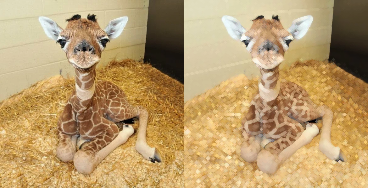
The kernel must have 2 dimensions.
- Parameters
tensor (
Tensor) – Image with shape \((B, C, H, W)\).kernel (
Tensor) – Positions of non-infinite elements of a flat structuring element. Non-zero values give the set of neighbors of the center over which the operation is applied. Its shape is \((k_x, k_y)\). For full structural elements use torch.ones_like(structural_element).structuring_element (
Optional[Tensor], optional) – Structuring element used for the grayscale dilation. It may be a non-flat structuring element. Default:Noneorigin (
Optional[List[int]], optional) – Origin of the structuring element. Default:Noneand uses the center of the structuring element as origin (rounding towards zero).border_type (
str, optional) – It determines how the image borders are handled, whereborder_valueis the value whenborder_typeis equal toconstant. Default:geodesicwhich ignores the values that are outside the image when applying the operation.border_value (
float, optional) – Value to fill past edges of input ifborder_typeisconstant. Default:0.0max_val (
float, optional) – The value of the infinite elements in the kernel. Default:10000.0engine (
str, optional) – convolution is faster and less memory hungry, and unfold is more stable numerically Default:'unfold'
- Return type
- Returns
Dilated image with shape \((B, C, H, W)\).
Note
See a working example here.
Example
>>> tensor = torch.rand(1, 3, 5, 5)
>>> kernel = torch.ones(3, 3)
>>> dilated_img = dilation(tensor, kernel)
- kornia.morphology.erosion(tensor, kernel, structuring_element=None, origin=None, border_type='geodesic', border_value=0.0, max_val=10000.0, engine='unfold')[source]
Return the eroded image applying the same kernel in each channel.
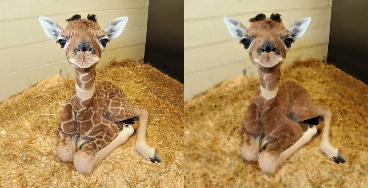
The kernel must have 2 dimensions.
- Parameters
tensor (
Tensor) – Image with shape \((B, C, H, W)\).kernel (
Tensor) – Positions of non-infinite elements of a flat structuring element. Non-zero values give the set of neighbors of the center over which the operation is applied. Its shape is \((k_x, k_y)\). For full structural elements use torch.ones_like(structural_element).structuring_element (torch.Tensor, optional) – Structuring element used for the grayscale dilation. It may be a non-flat structuring element. Default:
Noneorigin (
Optional[List[int]], optional) – Origin of the structuring element. Default:Noneand uses the center of the structuring element as origin (rounding towards zero).border_type (
str, optional) – It determines how the image borders are handled, whereborder_valueis the value whenborder_typeis equal toconstant. Default:geodesicwhich ignores the values that are outside the image when applying the operation.border_value (
float, optional) – Value to fill past edges of input if border_type isconstant. Default:0.0max_val (
float, optional) – The value of the infinite elements in the kernel. Default:10000.0engine (
str, optional) –convolutionis faster and less memory hungry, andunfoldis more stable numerically Default:'unfold'
- Return type
- Returns
Eroded image with shape \((B, C, H, W)\).
Note
See a working example here.
Example
>>> tensor = torch.rand(1, 3, 5, 5)
>>> kernel = torch.ones(5, 5)
>>> output = erosion(tensor, kernel)
- kornia.morphology.opening(tensor, kernel, structuring_element=None, origin=None, border_type='geodesic', border_value=0.0, max_val=10000.0, engine='unfold')[source]
Return the opened image, (that means, dilation after an erosion) applying the same kernel in each channel.
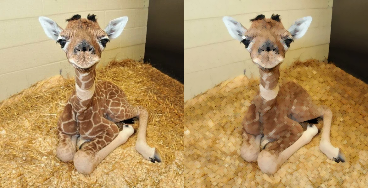
The kernel must have 2 dimensions.
- Parameters
tensor (
Tensor) – Image with shape \((B, C, H, W)\).kernel (
Tensor) – Positions of non-infinite elements of a flat structuring element. Non-zero values give the set of neighbors of the center over which the operation is applied. Its shape is \((k_x, k_y)\). For full structural elements use torch.ones_like(structural_element).structuring_element (
Optional[Tensor], optional) – Structuring element used for the grayscale dilation. It may be a non-flat structuring element. Default:Noneorigin (
Optional[List[int]], optional) – Origin of the structuring element. Default:Noneand uses the center of the structuring element as origin (rounding towards zero).border_type (
str, optional) – It determines how the image borders are handled, whereborder_valueis the value whenborder_typeis equal toconstant. Default:geodesicwhich ignores the values that are outside the image when applying the operation.border_value (
float, optional) – Value to fill past edges of input ifborder_typeisconstant. Default:0.0max_val (
float, optional) – The value of the infinite elements in the kernel. Default:10000.0engine (
str, optional) – convolution is faster and less memory hungry, and unfold is more stable numerically Default:'unfold'
- Returns
Opened image with shape \((B, C, H, W)\).
- Return type
Note
See a working example here.
Example
>>> tensor = torch.rand(1, 3, 5, 5)
>>> kernel = torch.ones(3, 3)
>>> opened_img = opening(tensor, kernel)
- kornia.morphology.closing(tensor, kernel, structuring_element=None, origin=None, border_type='geodesic', border_value=0.0, max_val=10000.0, engine='unfold')[source]
Return the closed image, (that means, erosion after a dilation) applying the same kernel in each channel.
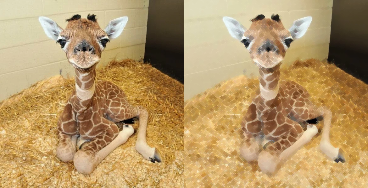
The kernel must have 2 dimensions.
- Parameters
tensor (
Tensor) – Image with shape \((B, C, H, W)\).kernel (
Tensor) – Positions of non-infinite elements of a flat structuring element. Non-zero values give the set of neighbors of the center over which the operation is applied. Its shape is \((k_x, k_y)\). For full structural elements use torch.ones_like(structural_element).structuring_element (
Optional[Tensor], optional) – Structuring element used for the grayscale dilation. It may be a non-flat structuring element. Default:Noneorigin (
Optional[List[int]], optional) – Origin of the structuring element. Default is None and uses the center of the structuring element as origin (rounding towards zero). Default:Noneborder_type (
str, optional) – It determines how the image borders are handled, whereborder_valueis the value whenborder_typeis equal toconstant. Default:geodesicwhich ignores the values that are outside the image when applying the operation.border_value (
float, optional) – Value to fill past edges of input ifborder_typeisconstant. Default:0.0max_val (
float, optional) – The value of the infinite elements in the kernel. Default:10000.0engine (
str, optional) – convolution is faster and less memory hungry, and unfold is more stable numerically Default:'unfold'
- Return type
- Returns
Closed image with shape \((B, C, H, W)\).
Note
See a working example here.
Example
>>> tensor = torch.rand(1, 3, 5, 5)
>>> kernel = torch.ones(3, 3)
>>> closed_img = closing(tensor, kernel)
- kornia.morphology.gradient(tensor, kernel, structuring_element=None, origin=None, border_type='geodesic', border_value=0.0, max_val=10000.0, engine='unfold')[source]
Return the morphological gradient of an image.
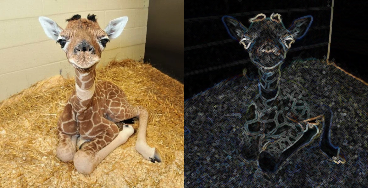
That means, (dilation - erosion) applying the same kernel in each channel. The kernel must have 2 dimensions.
- Parameters
tensor (
Tensor) – Image with shape \((B, C, H, W)\).kernel (
Tensor) – Positions of non-infinite elements of a flat structuring element. Non-zero values give the set of neighbors of the center over which the operation is applied. Its shape is \((k_x, k_y)\). For full structural elements use torch.ones_like(structural_element).structuring_element (
Optional[Tensor], optional) – Structuring element used for the grayscale dilation. It may be a non-flat structuring element. Default:Noneorigin (
Optional[List[int]], optional) – Origin of the structuring element. Default is None and uses the center of the structuring element as origin (rounding towards zero). Default:Noneborder_type (
str, optional) – It determines how the image borders are handled, whereborder_valueis the value whenborder_typeis equal toconstant. Default:geodesicwhich ignores the values that are outside the image when applying the operation.border_value (
float, optional) – Value to fill past edges of input ifborder_typeisconstant. Default:0.0max_val (
float, optional) – The value of the infinite elements in the kernel. Default:10000.0engine (
str, optional) – convolution is faster and less memory hungry, and unfold is more stable numerically Default:'unfold'
- Return type
- Returns
Gradient image with shape \((B, C, H, W)\).
Note
See a working example here.
Example
>>> tensor = torch.rand(1, 3, 5, 5)
>>> kernel = torch.ones(3, 3)
>>> gradient_img = gradient(tensor, kernel)
- kornia.morphology.top_hat(tensor, kernel, structuring_element=None, origin=None, border_type='geodesic', border_value=0.0, max_val=10000.0, engine='unfold')[source]
Return the top hat transformation of an image.
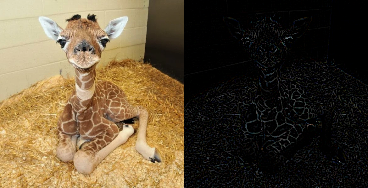
That means, (image - opened_image) applying the same kernel in each channel. The kernel must have 2 dimensions.
See
opening()for details.- Parameters
tensor (
Tensor) – Image with shape \((B, C, H, W)\).kernel (
Tensor) – Positions of non-infinite elements of a flat structuring element. Non-zero values give the set of neighbors of the center over which the operation is applied. Its shape is \((k_x, k_y)\). For full structural elements use torch.ones_like(structural_element).structuring_element (
Optional[Tensor], optional) – Structuring element used for the grayscale dilation. It may be a non-flat structuring element. Default:Noneorigin (
Optional[List[int]], optional) – Origin of the structuring element. Default:Noneand uses the center of the structuring element as origin (rounding towards zero).border_type (
str, optional) – It determines how the image borders are handled, whereborder_valueis the value whenborder_typeis equal toconstant. Default:geodesicwhich ignores the values that are outside the image when applying the operation.border_value (
float, optional) – Value to fill past edges of input ifborder_typeisconstant. Default:0.0max_val (
float, optional) – The value of the infinite elements in the kernel. Default:10000.0engine (
str, optional) – convolution is faster and less memory hungry, and unfold is more stable numerically Default:'unfold'
- Return type
- Returns
Top hat transformed image with shape \((B, C, H, W)\).
Note
See a working example here.
Example
>>> tensor = torch.rand(1, 3, 5, 5)
>>> kernel = torch.ones(3, 3)
>>> top_hat_img = top_hat(tensor, kernel)
- kornia.morphology.bottom_hat(tensor, kernel, structuring_element=None, origin=None, border_type='geodesic', border_value=0.0, max_val=10000.0, engine='unfold')[source]
Return the bottom hat transformation of an image.
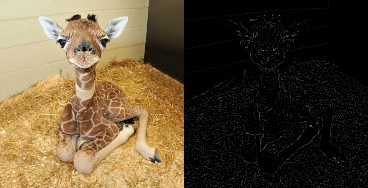
That means, (closed_image - image) applying the same kernel in each channel. The kernel must have 2 dimensions.
See
closing()for details.- Parameters
tensor (
Tensor) – Image with shape \((B, C, H, W)\).kernel (
Tensor) – Positions of non-infinite elements of a flat structuring element. Non-zero values give the set of neighbors of the center over which the operation is applied. Its shape is \((k_x, k_y)\). For full structural elements use torch.ones_like(structural_element).structuring_element (
Optional[Tensor], optional) – Structuring element used for the grayscale dilation. It may be a non-flat structuring element. Default:Noneorigin (
Optional[List[int]], optional) – Origin of the structuring element. Default:Noneand uses the center of the structuring element as origin (rounding towards zero).border_type (
str, optional) – It determines how the image borders are handled, whereborder_valueis the value whenborder_typeis equal toconstant. Default:geodesicwhich ignores the values that are outside the image when applying the operation.border_value (
float, optional) – Value to fill past edges of input ifborder_typeisconstant. Default:0.0max_val (
float, optional) – The value of the infinite elements in the kernel. Default:10000.0engine (
str, optional) – convolution is faster and less memory hungry, and unfold is more stable numerically Default:'unfold'
- Return type
- Returns
Top hat transformed image with shape \((B, C, H, W)\).
Note
See a working example here.
Example
>>> tensor = torch.rand(1, 3, 5, 5)
>>> kernel = torch.ones(3, 3)
>>> bottom_hat_img = bottom_hat(tensor, kernel)